


iOS 上传 ipa 报 -22938 排查记:Apple 封了密码登录,改用 App Store Connect 官方 Build Uploads API
现象
从 10 月 28 日开始,用 ios-uploader(以及各种转运脚本)往 App Store Connect 上传 ipa,全部失败,报错:
Found Bundle ID "xxx", Version 125 (1.2.5).
Unexpected token 'S', "Sign in wi"... is not valid JSON
HBuilderX 云打包出来的包是正常的,问题在上传环节。
排查过程
第一步:确认不是账号/密码问题
把同一个 App 专用密码拿去请求 Apple 的 CalDAV 服务,认证直接通过(HTTP 207)。再把这段密码拿去请求上传认证接口 contentdelivery.itunes.apple.com 的 authenticateForSession,返回的却是纯文本而不是 JSON:
Sign in with the app-specific password you generated. If you forgot the
app-specific password or need to create a new one, go to account.apple.com. (-22938)
同一个密码、同一个账号,一个通一个不通 —— 说明密码是好的。
第二步:确认是服务端封了这条通道
试了所有能试的变体,全部返回同一句话:
- 明文 / gzip 压缩请求体
- HTTP/1.1 与 HTTP/2
- JSON-RPC 端点与 SOAP
/ws/端点 - 换 User-Agent(
iTMSTransporter/4.2.0、4.3.1、Transporter/5.0) - 改用 App Store Connect API 密钥签出的 JWT 塞进
myacinfocookie 或 Bearer 头 - 备用域名
contentdelivery02
连"不存在的方法名"都返回同样的登录提示 —— 说明请求根本没进到后端服务,在网关层(响应头里能看到 Server: daiquiri/5、实例标签 26HOTFIX47)就被拦了。
结论:Apple 在网关层关闭了「Apple ID + App 专用密码」这条上传登录通道,不是客户端改个参数能绕过去的。
解决方案:走官方 Build Uploads API
Apple 有一个公开文档化的 App Store Connect API,里面的 Build Uploads 资源就是干上传这件事的,认证走 API 密钥(JWT),完全不碰上面那条被封的通道:
POST  /v1/buildUploads            登记一次构建上传(版本号 / build 号 / platform)
POST  /v1/buildUploadFiles        拿到对象存储的预签名分块上传 URL
PUT   <presigned-url>             按分块上传 ipa(每块 5MB)
PATCH /v1/buildUploadFiles/{id}   标记 uploaded=true
→ Apple 自动解析出 build,TestFlight / 提审可用
注意:
assetType的有效值是ASSET/ASSET_DESCRIPTION/ASSET_SPI,不是IPA。
准备
- App Store Connect → 用户和访问 → 集成 → App Store Connect API → 生成密钥(角色选 App Manager 或更高),下载
.p8(只能下载一次),记下 Key ID 和 Issuer ID - 拿到 App 的数字 ID(App Store Connect 后台 URL 里
apps/后面那串数字)
用现成工具
我把整个流程写成了一个零依赖的 Node 脚本(只用内置模块,Windows / macOS / Linux 都能跑),已开源:
GitHub: xxhshenqi/asc-ipa-uploader
Gitee: xiaoxianghui/asc-ipa-uploader
先装上(无需 npm 账号,2 秒,全局命令就是 asc-ipa-uploader):
npm i -g https://github.com/xxhshenqi/asc-ipa-uploader/archive/refs/heads/master.tar.gz用法:
# 先查 App ID
asc-ipa-uploader --key ./AuthKey_XXXX.p8 --key-id XXXXXXXXXX \
  --issuer <ISSUER_ID> --list-apps

# 上传(版本号 = CFBundleShortVersionString,build 号 = CFBundleVersion)
asc-ipa-uploader --key ./AuthKey_XXXX.p8 --key-id XXXXXXXXXX \
  --issuer <ISSUER_ID> --app <APP_ID> --ipa ./xxx.ipa --version 1.2.5 --build 125

# 上传完顺手把版本记录建好、build 关联上(之后去后台填更新说明提审即可)
asc-ipa-uploader ... --release
脚本做了几件省心的事:上传前先查同 build 号是否已存在(避免白传)、API 调用遇到新建密钥的瞬时 401 自动重试、分块上传带进度、传完轮询到 build 状态变 VALID 才退出。
实测一个 17MB 的包,两三分钟传完并转 VALID。
一点提醒
.p8私钥不要提交到仓库,也不要发群里;用环境变量传路径更安全(支持ASC_KEY_PATH/ASC_KEY_ID/ASC_ISSUER/ASC_APP_ID)- Apple 不允许重复的 build 号,同一个包要重传得先升 build 号
- 想继续用 Mac + 官方 Transporter 的,不受这次变更影响;受影响的是没有 Mac、靠第三方工具传包的场景
如果这个工具帮你解决了问题,欢迎 star;有 bug 或想加功能直接提 issue。
现象
从 10 月 28 日开始,用 ios-uploader(以及各种转运脚本)往 App Store Connect 上传 ipa,全部失败,报错:
Found Bundle ID "xxx", Version 125 (1.2.5).
Unexpected token 'S', "Sign in wi"... is not valid JSON
HBuilderX 云打包出来的包是正常的,问题在上传环节。
排查过程
第一步:确认不是账号/密码问题
把同一个 App 专用密码拿去请求 Apple 的 CalDAV 服务,认证直接通过(HTTP 207)。再把这段密码拿去请求上传认证接口 contentdelivery.itunes.apple.com 的 authenticateForSession,返回的却是纯文本而不是 JSON:
Sign in with the app-specific password you generated. If you forgot the
app-specific password or need to create a new one, go to account.apple.com. (-22938)
同一个密码、同一个账号,一个通一个不通 —— 说明密码是好的。
第二步:确认是服务端封了这条通道
试了所有能试的变体,全部返回同一句话:
- 明文 / gzip 压缩请求体
- HTTP/1.1 与 HTTP/2
- JSON-RPC 端点与 SOAP
/ws/端点 - 换 User-Agent(
iTMSTransporter/4.2.0、4.3.1、Transporter/5.0) - 改用 App Store Connect API 密钥签出的 JWT 塞进
myacinfocookie 或 Bearer 头 - 备用域名
contentdelivery02
连"不存在的方法名"都返回同样的登录提示 —— 说明请求根本没进到后端服务,在网关层(响应头里能看到 Server: daiquiri/5、实例标签 26HOTFIX47)就被拦了。
结论:Apple 在网关层关闭了「Apple ID + App 专用密码」这条上传登录通道,不是客户端改个参数能绕过去的。
解决方案:走官方 Build Uploads API
Apple 有一个公开文档化的 App Store Connect API,里面的 Build Uploads 资源就是干上传这件事的,认证走 API 密钥(JWT),完全不碰上面那条被封的通道:
POST  /v1/buildUploads            登记一次构建上传(版本号 / build 号 / platform)
POST  /v1/buildUploadFiles        拿到对象存储的预签名分块上传 URL
PUT   <presigned-url>             按分块上传 ipa(每块 5MB)
PATCH /v1/buildUploadFiles/{id}   标记 uploaded=true
→ Apple 自动解析出 build,TestFlight / 提审可用
注意:
assetType的有效值是ASSET/ASSET_DESCRIPTION/ASSET_SPI,不是IPA。
准备
- App Store Connect → 用户和访问 → 集成 → App Store Connect API → 生成密钥(角色选 App Manager 或更高),下载
.p8(只能下载一次),记下 Key ID 和 Issuer ID - 拿到 App 的数字 ID(App Store Connect 后台 URL 里
apps/后面那串数字)
用现成工具
我把整个流程写成了一个零依赖的 Node 脚本(只用内置模块,Windows / macOS / Linux 都能跑),已开源:
GitHub: xxhshenqi/asc-ipa-uploader
Gitee: xiaoxianghui/asc-ipa-uploader
先装上(无需 npm 账号,2 秒,全局命令就是 asc-ipa-uploader):
npm i -g https://github.com/xxhshenqi/asc-ipa-uploader/archive/refs/heads/master.tar.gz用法:
# 先查 App ID
asc-ipa-uploader --key ./AuthKey_XXXX.p8 --key-id XXXXXXXXXX \
  --issuer <ISSUER_ID> --list-apps

# 上传(版本号 = CFBundleShortVersionString,build 号 = CFBundleVersion)
asc-ipa-uploader --key ./AuthKey_XXXX.p8 --key-id XXXXXXXXXX \
  --issuer <ISSUER_ID> --app <APP_ID> --ipa ./xxx.ipa --version 1.2.5 --build 125

# 上传完顺手把版本记录建好、build 关联上(之后去后台填更新说明提审即可)
asc-ipa-uploader ... --release
脚本做了几件省心的事:上传前先查同 build 号是否已存在(避免白传)、API 调用遇到新建密钥的瞬时 401 自动重试、分块上传带进度、传完轮询到 build 状态变 VALID 才退出。
实测一个 17MB 的包,两三分钟传完并转 VALID。
一点提醒
.p8私钥不要提交到仓库,也不要发群里;用环境变量传路径更安全(支持ASC_KEY_PATH/ASC_KEY_ID/ASC_ISSUER/ASC_APP_ID)- Apple 不允许重复的 build 号,同一个包要重传得先升 build 号
- 想继续用 Mac + 官方 Transporter 的,不受这次变更影响;受影响的是没有 Mac、靠第三方工具传包的场景
如果这个工具帮你解决了问题,欢迎 star;有 bug 或想加功能直接提 issue。
收起阅读 »
社区App上架Google Play:拉黑功能设计、审核要求与避坑指南
先说我自己踩过的坑。上个月,我提交了一个带私信和评论功能的社区App,功能做得很完整,隐私政策也写了,结果第二天就收到了Google Play的审核拒绝邮件。拒信的核心只有一句话:你的App允许用户之间互动,但没有提供“block”用户的能力。翻译成大白话就是——你连拉黑、屏蔽某个用户的功能都没有,凭什么让用户在你这儿社交?
那时候,我才真正把Google Play“用户生成内容”(UGC)相关的政策条款认真读了一遍。很多人以为这是一条“建议”,实际上在Google Play的上架规则里,对任何允许用户互动、展示用户内容的App来说,提供拉黑功能属于“必须有”的硬性门槛,不是加分项。这篇分享中,我围绕这件事讲清楚几个关键问题:为什么Google Play会卡这条?拉黑功能到底要覆盖哪些场景?服务端和客户端怎么实现才不会被审核抓漏洞?提审前有哪些自查动作?
如果你正在做社区App、陌生人社交,或者带聊天功能的工具型App,又或者游戏里有人人互动,这篇文章值得你认真看完。
1. 为什么Google Play强制要求“拉黑某个用户”
1.1 一次审核被拒的真实经历
我的App被拒之后,对应的政策路径写得很清楚:Developer Program Policies,也就是开发者计划政策中关于“用户生成内容”和“社交功能”的部分。邮件原话大概是:
“Your app allows users to interact with each other, but does not provide a way for users to block abusive users.”
大意是,你的应用允许用户间互相交流,但你却没有提供让用户屏蔽恶意用户的手段。拒信一般还会附上说明:如果你想申诉,需要提供包含屏蔽功能的具体路径和操作截图。
那次被拒让我明白了一件事:Google Play的审核并不只是检查你的App“能不能跑”,还会检查一个App在真实用户场景下“安不安全”。尤其社交功能越重,审核越严。而且这个拉黑功能不是“你有入口就行”,而是点进去之后真的能让双方断开互动渠道。如果只是把一个按钮放在设置里,点完没有实际效果,审核员一样会判不通过。

1.2 Google Play“用户生成内容”政策到底在说什么
我去Google Play Console后台仔细翻了一遍关联政策文档,有几点很关键:
如果App里存在用户生成内容,并且这些内容能展示给其他用户,那App就必须提供内容举报入口;
如果App允许用户互动,包括私信、评论、关注、好友邀请、聊天室发言,就必须提供用户屏蔽能力;
屏蔽功能必须对用户可见、可操作,并且要能实际限制被屏蔽方发起互动;
举报和屏蔽可以并列存在,但屏蔽必须是一个独立可用的入口,不能被举报入口完全替代。
说得更直白一点,Google Play的逻辑是:你的平台让用户能说话、能建立关系、能传播内容,那你就必须给每个用户一个“一键逃离”的安全通道。拉黑就是这个逃生通道。一个人被骚扰时,如果只能选择删掉整个App,那问题就会升级成投诉、纠纷甚至更严重的后果。Google Play作为平台方,自然要提前把这种风险转嫁给开发者。
最容易误解的一点是:很多人觉得只有“社交App”才需要做拉黑。实际上,只要你的App里有用户头像、昵称、评论、评分、弹幕、好友关系这些元素,哪怕是工具型应用,审核员都有可能判定为“允许用户互动”。我当时就以为自己的App只是个工具社区,结果评论区的“回复功能”就被算成了用户间互动。所有做工具+社区混合形态的开发者,提前按社交应用的标准来准备,比收到拒信后再补要省事得多。
1.3 哪些类型的App会被这条政策卡住
结合我和同行交流的经验,基本可以归纳成下面几类:
即时通讯类:一对一私聊、群聊、语音聊天;
陌生人社交类:匹配、关注、打招呼、附近的人;
社区论坛类:发帖、回帖、评论、点赞、弹幕;
直播类:弹幕、私信、连麦、关注主播;
工具+社区类:评分、评论、用户主页、加好友;
游戏类:游戏内聊天、队伍邀请、好友系统、公屏发言。
游戏类特别容易忽略。很多游戏团队觉得游戏有后台封号机制就够了,但封号和用户拉黑完全是两码事。封号是运营者的管理手段,拉黑是用户的自助保护手段。Google Play在审核游戏时也会检查用户侧是否存在屏蔽功能,不能靠后台封禁来替代。
2. 拉黑功能的正确打开方式:先弄懂需求边界
2.1 拉黑不是“删除好友”,是三件事
很多开发同学对拉黑的第一反应是“把对方从好友列表里删掉”,这个理解太浅。真正合规且可用的拉黑功能至少包含三层:
第一层,切断一切主动连接。被拉黑之后,对方不能继续给你发私信、评论、点赞、关注请求、好友申请,也不能邀请你进群、@你。这一层最基础,审核员第一个动作就是拿小号试“能不能发私信”。如果拉黑之后私信还能正常发出去,直接被判不通过。
第二层,双向可视隔离。被拉黑方不再看到你的公开主页、动态、帖子,拉黑方也不希望再看到对方的内容。双向隔离虽然不是 Google Play 审核明文卡死的条件,但从产品体验和审核印象来说都更安全。我推荐做成“互不可见”,至少涉及用户主动发布的内容要做到双向隔离。
第三层,历史内容清理和折叠。拉黑之后,以前的互动记录怎么办?历史上互相评论过的帖子、点赞记录、私信记录、关注关系,都需要妥善处理。理想状态是:聊天记录保留但进入冻结状态,不能再新发消息;评论和点赞全部折叠;关注自动解除;双方主页对外显示为“内容不存在”。这层细节审核员未必逐个验证,但真实用户非常敏感,做不好就会被投诉。
2.2 先画一张可直接抄的功能设计清单
我在项目里列过一个检查清单,每个需求评审前都要过一遍:
| 编号 | 检查项 |
|---|
推荐做法
| | 1 | 拉黑入口位置 |
|---|
用户主页、聊天窗口右上角、评论长按菜单、关注列表
| | 2 | 被拉黑方的提示 |
|---|
提示“暂时无法操作”或“用户状态异常”,不要直接显示“你已被拉黑”
| | 3 | 是否双向 |
|---|
推荐双向隔离,双方互不可见
| | 4 | 好友/关注关系 |
|---|
拉黑后自动解除关注与好友关系
| | 5 | 历史内容 |
|---|
历史评论折叠隐藏,私信禁止新消息
| | 6 | 解除拉黑 |
|---|
提供“解除屏蔽”按钮,解除后恢复全部能力
| | 7 | 与举报联动 |
|---|
拉黑成功后可选“同时举报该用户”
| | 8 | 拉黑名单管理 |
|---|
设置页展示已拉黑列表,支持解除
| | 9 | 数据实时生效 |
|---|
服务端生效,客户端本地同步,双向消息流即时更新
|
这份清单不只是给产品经理看的,它本身就是提审前的自测表。后面审核部分我会继续展开。
2.3 一个容易被忽略的设计误区:拉黑后对方还能搜到你
我见过不少App的拉黑实现是“只挡评论和私信”,但拉黑后对方在搜索框里依然能搜到你的用户ID。虽然点进主页是空白,但搜索结果列表里仍然展示了头像和昵称。审核员在测试的时候就会记录“block功能不完整”。更麻烦的是,对方还能通过旧聊天入口重新发起一个“新会话”,或者通过@用户名把你拖进群里,这些都是“假屏蔽”的表现。
正确做法是让黑名单参与“全量召回拦截”。搜索、推荐、通讯录匹配、群聊@、好友验证、历史会话入口,所有能把你的头像、昵称、主页暴露出去的场景,查询前都要先过滤掉黑名单关系。我在项目里把这个策略叫“黑名单优先于一切读取”。所有涉及用户查询的接口,入参除了当前操作者,还要检查双方是否处于屏蔽关系,一旦命中直接返回空或占位数据。
这里有个技术难点:黑名单过滤不能挂在业务层到处写判断,而是要下沉到数据访问层。我们封装了一个BlockFilter组件,用AOP拦截所有查询类DAO方法,查询前自动追加屏蔽条件。新增业务模块时不需要每个接口都重写一遍,后期维护省了大量人力。
3. 技术实现:服务端屏蔽加本地缓存的完整方案
3.1 数据表设计:两张核心表解决大多数问题
我们项目里把“拉黑关系”和“拉黑事件日志”分开存储。核心表结构大概是这样的:
-- 黑名单关系表
CREATE TABLE user_block_relations (
    id BIGINT PRIMARY KEY AUTO_INCREMENT,
    blocker_id VARCHAR(64) NOT NULL COMMENT '拉黑发起方用户ID',
    blocked_id VARCHAR(64) NOT NULL COMMENT '被拉黑用户ID',
    source VARCHAR(20) NOT NULL COMMENT '拉黑来源:CHAT/COMMENT/HOME',
    status TINYINT NOT NULL DEFAULT 1 COMMENT '1-生效;0-已解除',
    created_at DATETIME NOT NULL,
    updated_at DATETIME NOT NULL,
    UNIQUE KEY uk_block_pair (blocker_id, blocked_id, status),
    KEY idx_blocker (blocker_id, status),
    KEY idx_blocked (blocked_id, status)
) ENGINE=InnoDB DEFAULT CHARSET=utf8mb4;
几个细节说一下为什么这样设计:
用
blocker_id + blocked_id + status
做唯一键,是为了保证同一个屏蔽关系只有一条生效记录,避免并发情况下插入两条完全一样的记录;
加
source
该字段是为了知道用户是在聊天窗口还是评论区点的拉黑,方便后续做入口位分析,审核答辩时也能展示完整的拉黑来源链路;
解除拉黑时不做物理删除,只把status改成0,保留历史关系。万一出现用户纠纷、举报取证,能查到谁在什么时间拉黑过谁;
额外建议一张
user_block_events
事件表,专门记录拉黑和解除的操作时间。客户端通过事件流做增量同步,不用每次全量拉黑名单。
-- 拉黑事件日志表
CREATE TABLE user_block_events (
    id BIGINT PRIMARY KEY AUTO_INCREMENT,
    relation_id BIGINT NOT NULL,
    event_type TINYINT NOT NULL COMMENT '1-屏蔽;2-解除',
    operator_id VARCHAR(64) NOT NULL,
    created_at DATETIME NOT NULL,
    KEY idx_relation (relation_id)
) ENGINE=InnoDB DEFAULT CHARSET=utf8mb4;
事件表的意义不只是审计,它还能对接推送服务,让所有端实时感知屏蔽关系的变化。
3.2 接口设计:一份可以直接落地的REST API
服务端最少要提供四个基础接口:
1. 添加拉黑
POST /api/v1/block
Request: { "blocked_id": "user_123", "source": "CHAT" }
Response: { "code": 0, "data": { "relation_id": "12345" } }

2. 解除拉黑
DELETE /api/v1/block/{blocked_id}
Response: { "code": 0 }

3. 查询我的拉黑名单
GET /api/v1/blocks?page=1&page_size=20
Response: { "data": { "list": ["user_123", "user_456"] } }

4. 批量查询关系状态
POST /api/v1/block/status
Request: { "target_ids": ["user_123", "user_456"] }
Response: { "code": 0, "data": { "user_123": "BLOCKED", "user_456": "NORMAL" } }
其实第4个批量查询接口最容易被新团队漏掉。聊天列表页、评论列表页、关注列表页一次要渲染几十个用户,如果逐个调单查接口,性能和体验都会崩。用批量接口一次拿回所有关系状态,在本地做映射,业务方只需要一次RPC就能拿到全部数据。
3.3 服务端拦截策略:黑名单优先,所有业务统一过滤
拉黑功能真正难的点不在表设计,而在“拦截得够不够干净”。所谓干净,就是被拉黑的人在所有业务链路上都不可触达。我们项目里重点做拦截的地方有四个:
第一是对话列表和私信会话。对方发送私信时必须校验blocker和blocked是否存在生效关系,命中则直接丢弃消息。这里有一个隐藏的“竞态问题”——A拉黑B的同时B正好在发消息,如果读的是旧缓存,消息还是会发出去。我们的做法是,在消息写入数据库之前再做一次最终校验,一旦发现双方已处于屏蔽关系,消息直接进入失败队列,不走正常入库路径。这和发送前校验是双保险,不能省。
第二是评论、点赞、帖子互动。拉黑之后,对方不能评论我的内容,我也不能评论对方的内容。这个判断不能只写在客户端隐藏按钮,服务端查询和写入时都必须校验,否则很容易被绕过。
第三是关注、好友、群聊。拉黑后,对方如果还在我的好友列表里,客户端会看到一个“好友点进主页却是空白”的奇怪状态。我们在实现时把关注列表查询也走了BlockFilter,命中关系直接过滤,数量统计同步扣减。如果数量对不上,马上就会收到“我关注了100个人,为什么列表只有99个”的用户反馈。
第四是搜索和推荐流。搜索用户、通讯录匹配、推荐关注列表,这些场景同样要走拦截流程。黑名单里的用户必须直接被过滤掉,不能让用户再看到“我想拉黑的人”。

3.4 客户端缓存与UI处理:让“屏蔽感”消失
服务端完成拦截之后,客户端还需要做“体面”的展示处理。
被拉黑方看到的效果,我总结为“温和的空白”。尝试进入对方主页时,显示“用户状态异常”或“用户不存在”,不要直接显示“你已被拉黑”。这一方面可以避免激化矛盾,另一方面也能防止被拉黑方换个账号继续纠缠。有些App喜欢显示“对方开启了朋友验证,你还不是他朋友”,在拉黑场景下这会诱导用户反复尝试添加,体验极差。
聊天窗口要做置灰处理,输入框需要禁用。如果使用的是原生IM组件,要把本地会话的输入状态改成forbidden。评论区里,对被拉黑方的帖子直接隐藏评论,历史评论折叠到一个“查看已隐藏内容”的入口,点击后仍然显示“内容不存在”。这样审核员想验证“历史评论是不是真的没了”时,也能有合理的交代。
客户端本地还要维护一份“黑名单快照”,用Room或者本地数据库存一份blocked_id集合。每次拉取聊天列表、评论列表时,先用本地集合过滤一遍,再交给UI渲染。为什么一定要做本地过滤?因为服务端下发的列表可能没有完成过滤,或者审核员在弱网环境下测试,客户端如果没有本地处理能力,断网时历史评论就可能露出来,被判定为“拉黑无效”。我线上遇到过一次类似问题,补上本地过滤后基本就稳了。
3.5 拉黑后的“软删除”与历史数据处理
拉黑之后历史数据怎么处理,我们在产品上做了很多取舍。
私信记录保留整个会话,但会话进入冻结状态,无法发送新消息。会话页顶部提示“对方已关闭私信通道”。为什么不全删?因为全删会带来不可逆的损失。万一以后解除拉黑,历史消息找不回来,用户必然会投诉。另外从合规角度讲,私信属于通信数据,随意删除反而可能带来数据合规风险。
帖子评论的处理方式是“折叠成隐藏态”。也就是把被拉黑方在帖子下的评论置为hidden,对外表现像被删除,但后台数据仍然保留。这样既满足了“拉黑后对方不能再出现在我的帖子下面”,又保留了审计和取证能力。如果不保留后台数据,那至少要把评论数、点赞数等聚合统计一起改掉,否则数字对不上会引发更多问题。
4. 审核提交与自查清单:把“必须有”变成“审核稳过”
4.1 提审前必测的10个用例
提交Google Play之前,建议团队先用两个测试账号完整跑一遍下面这张表:
| 序号 | 测试场景 |
|---|
通过标准
| | 1 | 用户A拉黑用户B |
|---|
A拉黑成功,B端状态变为已屏蔽
| | 2 | B给A发私信 |
|---|
消息发送失败,B端提示“无法发送”
| | 3 | B评论A的帖子 |
|---|
提交失败或评论不可见
| | 4 | B搜索A的用户名 |
|---|
搜索结果不展示A,或点击后显示空白
| | 5 | B查看关注列表 |
|---|
列表不出现A
| | 6 | A解除拉黑B |
|---|
B恢复正常,可重新搜索、关注、私信
| | 7 | B再拉黑A |
|---|
A也被B隔离,互黑状态生效
| | 8 | 拉黑后再关注 |
|---|
关注失败,B端看不到可关注按钮
| | 9 | 历史评论折叠 |
|---|
A在原帖下看不到B的历史评论
| | 10 | 拉黑列表管理 |
|---|
A在设置页可查看和解除拉黑
|
这10个用例建议做成自动化回归,每次发版前都跑一遍。审核员不一定全测,但你自己全测过一遍之后,心里至少不慌。
4.2 隐私政策和审核说明里怎么写“拉黑”
隐私政策千万不要只放个模板。Google Play审核团队会核对隐私政策的内容和实际功能是否一致。如果App里有拉黑功能,建议在“用户互动”或“用户安全”章节写类似下面这段话:
“为保护用户免受骚扰和不当互动,本应用提供用户屏蔽功能。用户可以通过用户主页、聊天窗口或评论功能中的屏蔽入口,阻止特定用户继续向您发送消息、评论或查看您的公开内容。被屏蔽的用户无法向您发起新的互动请求。屏蔽关系存储于服务器,用于执行屏蔽操作和保障平台安全,您可随时在设置中查看并解除屏蔽。”
要点是写清楚三个部分:功能入口、屏蔽效果、数据如何存储和解除方式。审核员看隐私政策最在意的就是你承诺的事和实际功能是否一致,千万不要写了不做。
同时在 Google Play Console 的“App 内容”页面里,有一个“用户生成内容”相关声明,需要确认“你的应用提供了举报和屏蔽机制”,并描述机制的具体位置。描述写得越具体越好,比如“在用户主页右上角提供屏蔽按钮,在聊天窗口提供举报和屏蔽入口”。不要只写“提供用户安全功能”,那太模糊了。
4.3 被驳回时的申诉策略
如果已经被拒,申诉信要围绕“我们确实实现了拉黑功能”出示证据。我整理过一个申诉模板,基本逻辑是:
明确指出被拒原因对应的政策段落,说明自己已经理解;
列出实现的屏蔽功能入口路径,附上交互截图;
附上两个测试账号的实测录屏,最好展示从客户端到服务端的完整流程;
说明历史数据如何处理,解除拉黑机制如何工作;
承诺在隐私政策中同步更新对应描述,并提供更新后的链接。
给审核员的截图建议包含三个核心画面:拉黑入口、拉黑成功提示、被拉黑方尝试私信时失败。三个画面连起来就是一条完整的证据链。实测下来,只要功能真实可达,申诉通常 1 到 3 个工作日复核通过。
4.4 多版本兼容与发布节奏提醒
如果 App 已经上线了,新增拉黑功能属于功能变更,老版本要先做兼容。很多老版本没有拉黑按钮,但服务端已经加了拦截逻辑,老版本用户发给你的私信可能被静默丢弃,用户会困惑“消息怎么发不出去”。发布节奏上建议先发服务端,再发客户端,同时保留一个“老版本降级开关”。服务端识别到客户端版本过旧时,把私信拦截从“静默丢弃”改成“返回对方开启屏蔽提示”,体验会好很多。
5. 常见问题与排查技巧实录
5.1 拉黑后对方仍看到评论的缓存问题
这是最常见的问题。App 列表页一般都有 CDN 缓存或者本地缓存,拉黑之后,旧的缓存数据如果不失效,对方首页推荐流仍可能刷出你的历史动态和评论。审核员去测的时候,刚发的内容还留在缓存里,很容易误判为“拉黑失败”。
排查思路:确认拉黑接口是否触发了相关缓存 key 的删除,或者在读取时增加了 blocked 过滤。我在实践里给所有动态 Feeds 接口增加了一个
blocked_user_ids
参数,每次请求都把客户端本地黑名单集合传上去,服务端查询时用IN条件过滤。参数可能较长,可以压缩传输或拆成两次请求。实测效果显著,基本杜绝了历史内容残留。
5.2 推送通知泄露被拉黑状态
拉黑之后,如果对方发来消息,服务端拦截了私信,但推送通道如果走了另一个链路,对方还是可能收到“你收到一条新消息”的推送。更尴尬的是,推送内容可能直接带了对方昵称和头像,等于变相告诉被拉黑方“你还看得到我”。这不是审核卡点,但真实用户会非常不满。
处理办法:消息推送必须在下发前校验block关系。把推送服务里的“发送”动作和私信发送接口串在同一事务里,私信被拦截时,推送事件也一并丢弃。我们曾遇到推送系统和主业务分属两套系统的情况,后来特地在消息队列消费端加了一道校验,才把这个隐患完全堵住。
5.3 黑名单同步延迟导致还能短暂操作
客户端本地缓存生效时间太长,会出现“拉黑完刷新聊天列表,对方又发来一条新消息”的假象,本质是同步链路问题。
解决策略:拉黑成功瞬间,客户端本地立刻把blocked_id写入本地快照,同时向服务端发起增量同步,服务端再向下发到其他设备。聊天消息的长连接通道也要监听“block关系变更事件”,一旦收到事件立刻更新内存中的黑名单集合。等于三层保障:本地立即生效、增量同步兜底、长连接事件兜底。三层都做了,迟滞问题基本消失。
5.4 审核员是怎么验证拉黑功能的
不少同行问过:Google Play审核员到底怎么测拉黑?从公开资料和实际经历来看,审核团队会模拟真实用户操作,用两个测试账号走完整互动链路。典型路径是:
先用账号A在帖子下评论或给账号B发私信,验证两个账号确实能互动;再用账号B在A的主页点“屏蔽”;接着换回账号A,尝试评论、私信、搜索、关注B;最后检查B的列表中是否还展示A。整个过程简单粗暴,但测的就是“点完拉黑后还能不能继续互动”。
如果你的App只在评论模块生效,私信模块漏了,或者只在App内部生效,Web端漏了,审核员大概率都会发现。所以提审前用两个测试账号完整跑一遍“评论-私信-关注”三个核心场景,是最重要的自查动作。
5.5 常见错误实现总结
我把见过的问题整理成一张表,方便大家对照排查:
| 错误实现 | 表现 |
|---|
正确做法
| | 只在前端隐藏按钮 | 拉黑后可被接口绕过 |
|---|
服务端校验block关系
| | 拉黑后只禁言不隔离主页 | 被拉黑方仍能看到主页内容 |
|---|
双向隔离
| | 历史评论不折叠 | 评论区仍展示被拉黑方发言 |
|---|
隐藏历史评论
| | 覆盖场景不全 | 能屏蔽评论但还能关注 |
|---|
所有互动场景统一走BlockFilter
| | 解除拉黑后关系恢复不干净 | 重新显示被关注状态 |
|---|
解除时同步解除关注、好友关系
| | 推送不走关系校验 | 拉黑后仍推送“新消息” |
|---|
推送链路同步校验
|
这张表也是我后来给团队做Code Review时的Checklist。每次看到和“拉黑”相关的代码,我都会多问一句:这个业务场景是不是所有入口都拦了,是不是服务端真的做了校验。
最后再分享一个我很受用的小设计:把“举报”和“拉黑”串成一条链路。在拉黑成功的弹窗里加一个“同时举报该用户”的按钮,默认不勾选。这样既不打断拉黑流程,又给了用户升级治理的入口。Google Play对举报功能的重视程度完全不亚于拉黑,把两者绑定在一起,审核说明里还能写一句“用户可以在拉黑的同时一键举报”,审核人员看到这种设计通常会更有底。
如果你做的不是纯社交App,而是工具类App,也建议哪怕产品里只有最浅的“评论互动”,都把拉黑功能做进去。这不是选择题,而是上架Google Play的必答题。与其提审被拒再加班补,不如产品设计阶段就把这条列为优先级最高的合规需求。我在实际项目里的体会是,拉黑功能最难的从来不是技术,而是产品经理和开发对“拉黑到底要拦哪些场景”理解不一致。把前期的功能设计清单对齐,后面的实现就会顺畅很多。这条路我已经替大家趟过一遍,能帮你少走一点弯路是一点。如果你们也被审核卡过,别慌,按上面的清单多测几轮,把每个漏洞都堵上,通过只是时间问题。
先说我自己踩过的坑。上个月,我提交了一个带私信和评论功能的社区App,功能做得很完整,隐私政策也写了,结果第二天就收到了Google Play的审核拒绝邮件。拒信的核心只有一句话:你的App允许用户之间互动,但没有提供“block”用户的能力。翻译成大白话就是——你连拉黑、屏蔽某个用户的功能都没有,凭什么让用户在你这儿社交?
那时候,我才真正把Google Play“用户生成内容”(UGC)相关的政策条款认真读了一遍。很多人以为这是一条“建议”,实际上在Google Play的上架规则里,对任何允许用户互动、展示用户内容的App来说,提供拉黑功能属于“必须有”的硬性门槛,不是加分项。这篇分享中,我围绕这件事讲清楚几个关键问题:为什么Google Play会卡这条?拉黑功能到底要覆盖哪些场景?服务端和客户端怎么实现才不会被审核抓漏洞?提审前有哪些自查动作?
如果你正在做社区App、陌生人社交,或者带聊天功能的工具型App,又或者游戏里有人人互动,这篇文章值得你认真看完。
1. 为什么Google Play强制要求“拉黑某个用户”
1.1 一次审核被拒的真实经历
我的App被拒之后,对应的政策路径写得很清楚:Developer Program Policies,也就是开发者计划政策中关于“用户生成内容”和“社交功能”的部分。邮件原话大概是:
“Your app allows users to interact with each other, but does not provide a way for users to block abusive users.”
大意是,你的应用允许用户间互相交流,但你却没有提供让用户屏蔽恶意用户的手段。拒信一般还会附上说明:如果你想申诉,需要提供包含屏蔽功能的具体路径和操作截图。
那次被拒让我明白了一件事:Google Play的审核并不只是检查你的App“能不能跑”,还会检查一个App在真实用户场景下“安不安全”。尤其社交功能越重,审核越严。而且这个拉黑功能不是“你有入口就行”,而是点进去之后真的能让双方断开互动渠道。如果只是把一个按钮放在设置里,点完没有实际效果,审核员一样会判不通过。
1.2 Google Play“用户生成内容”政策到底在说什么
我去Google Play Console后台仔细翻了一遍关联政策文档,有几点很关键:
如果App里存在用户生成内容,并且这些内容能展示给其他用户,那App就必须提供内容举报入口;
如果App允许用户互动,包括私信、评论、关注、好友邀请、聊天室发言,就必须提供用户屏蔽能力;
屏蔽功能必须对用户可见、可操作,并且要能实际限制被屏蔽方发起互动;
举报和屏蔽可以并列存在,但屏蔽必须是一个独立可用的入口,不能被举报入口完全替代。
说得更直白一点,Google Play的逻辑是:你的平台让用户能说话、能建立关系、能传播内容,那你就必须给每个用户一个“一键逃离”的安全通道。拉黑就是这个逃生通道。一个人被骚扰时,如果只能选择删掉整个App,那问题就会升级成投诉、纠纷甚至更严重的后果。Google Play作为平台方,自然要提前把这种风险转嫁给开发者。
最容易误解的一点是:很多人觉得只有“社交App”才需要做拉黑。实际上,只要你的App里有用户头像、昵称、评论、评分、弹幕、好友关系这些元素,哪怕是工具型应用,审核员都有可能判定为“允许用户互动”。我当时就以为自己的App只是个工具社区,结果评论区的“回复功能”就被算成了用户间互动。所有做工具+社区混合形态的开发者,提前按社交应用的标准来准备,比收到拒信后再补要省事得多。
1.3 哪些类型的App会被这条政策卡住
结合我和同行交流的经验,基本可以归纳成下面几类:
即时通讯类:一对一私聊、群聊、语音聊天;
陌生人社交类:匹配、关注、打招呼、附近的人;
社区论坛类:发帖、回帖、评论、点赞、弹幕;
直播类:弹幕、私信、连麦、关注主播;
工具+社区类:评分、评论、用户主页、加好友;
游戏类:游戏内聊天、队伍邀请、好友系统、公屏发言。
游戏类特别容易忽略。很多游戏团队觉得游戏有后台封号机制就够了,但封号和用户拉黑完全是两码事。封号是运营者的管理手段,拉黑是用户的自助保护手段。Google Play在审核游戏时也会检查用户侧是否存在屏蔽功能,不能靠后台封禁来替代。
2. 拉黑功能的正确打开方式:先弄懂需求边界
2.1 拉黑不是“删除好友”,是三件事
很多开发同学对拉黑的第一反应是“把对方从好友列表里删掉”,这个理解太浅。真正合规且可用的拉黑功能至少包含三层:
第一层,切断一切主动连接。被拉黑之后,对方不能继续给你发私信、评论、点赞、关注请求、好友申请,也不能邀请你进群、@你。这一层最基础,审核员第一个动作就是拿小号试“能不能发私信”。如果拉黑之后私信还能正常发出去,直接被判不通过。
第二层,双向可视隔离。被拉黑方不再看到你的公开主页、动态、帖子,拉黑方也不希望再看到对方的内容。双向隔离虽然不是 Google Play 审核明文卡死的条件,但从产品体验和审核印象来说都更安全。我推荐做成“互不可见”,至少涉及用户主动发布的内容要做到双向隔离。
第三层,历史内容清理和折叠。拉黑之后,以前的互动记录怎么办?历史上互相评论过的帖子、点赞记录、私信记录、关注关系,都需要妥善处理。理想状态是:聊天记录保留但进入冻结状态,不能再新发消息;评论和点赞全部折叠;关注自动解除;双方主页对外显示为“内容不存在”。这层细节审核员未必逐个验证,但真实用户非常敏感,做不好就会被投诉。
2.2 先画一张可直接抄的功能设计清单
我在项目里列过一个检查清单,每个需求评审前都要过一遍:
| 编号 | 检查项 |
|---|
推荐做法
| | 1 | 拉黑入口位置 |
|---|
用户主页、聊天窗口右上角、评论长按菜单、关注列表
| | 2 | 被拉黑方的提示 |
|---|
提示“暂时无法操作”或“用户状态异常”,不要直接显示“你已被拉黑”
| | 3 | 是否双向 |
|---|
推荐双向隔离,双方互不可见
| | 4 | 好友/关注关系 |
|---|
拉黑后自动解除关注与好友关系
| | 5 | 历史内容 |
|---|
历史评论折叠隐藏,私信禁止新消息
| | 6 | 解除拉黑 |
|---|
提供“解除屏蔽”按钮,解除后恢复全部能力
| | 7 | 与举报联动 |
|---|
拉黑成功后可选“同时举报该用户”
| | 8 | 拉黑名单管理 |
|---|
设置页展示已拉黑列表,支持解除
| | 9 | 数据实时生效 |
|---|
服务端生效,客户端本地同步,双向消息流即时更新
|
这份清单不只是给产品经理看的,它本身就是提审前的自测表。后面审核部分我会继续展开。
2.3 一个容易被忽略的设计误区:拉黑后对方还能搜到你
我见过不少App的拉黑实现是“只挡评论和私信”,但拉黑后对方在搜索框里依然能搜到你的用户ID。虽然点进主页是空白,但搜索结果列表里仍然展示了头像和昵称。审核员在测试的时候就会记录“block功能不完整”。更麻烦的是,对方还能通过旧聊天入口重新发起一个“新会话”,或者通过@用户名把你拖进群里,这些都是“假屏蔽”的表现。
正确做法是让黑名单参与“全量召回拦截”。搜索、推荐、通讯录匹配、群聊@、好友验证、历史会话入口,所有能把你的头像、昵称、主页暴露出去的场景,查询前都要先过滤掉黑名单关系。我在项目里把这个策略叫“黑名单优先于一切读取”。所有涉及用户查询的接口,入参除了当前操作者,还要检查双方是否处于屏蔽关系,一旦命中直接返回空或占位数据。
这里有个技术难点:黑名单过滤不能挂在业务层到处写判断,而是要下沉到数据访问层。我们封装了一个BlockFilter组件,用AOP拦截所有查询类DAO方法,查询前自动追加屏蔽条件。新增业务模块时不需要每个接口都重写一遍,后期维护省了大量人力。
3. 技术实现:服务端屏蔽加本地缓存的完整方案
3.1 数据表设计:两张核心表解决大多数问题
我们项目里把“拉黑关系”和“拉黑事件日志”分开存储。核心表结构大概是这样的:
-- 黑名单关系表
CREATE TABLE user_block_relations (
    id BIGINT PRIMARY KEY AUTO_INCREMENT,
    blocker_id VARCHAR(64) NOT NULL COMMENT '拉黑发起方用户ID',
    blocked_id VARCHAR(64) NOT NULL COMMENT '被拉黑用户ID',
    source VARCHAR(20) NOT NULL COMMENT '拉黑来源:CHAT/COMMENT/HOME',
    status TINYINT NOT NULL DEFAULT 1 COMMENT '1-生效;0-已解除',
    created_at DATETIME NOT NULL,
    updated_at DATETIME NOT NULL,
    UNIQUE KEY uk_block_pair (blocker_id, blocked_id, status),
    KEY idx_blocker (blocker_id, status),
    KEY idx_blocked (blocked_id, status)
) ENGINE=InnoDB DEFAULT CHARSET=utf8mb4;
几个细节说一下为什么这样设计:
用
blocker_id + blocked_id + status
做唯一键,是为了保证同一个屏蔽关系只有一条生效记录,避免并发情况下插入两条完全一样的记录;
加
source
该字段是为了知道用户是在聊天窗口还是评论区点的拉黑,方便后续做入口位分析,审核答辩时也能展示完整的拉黑来源链路;
解除拉黑时不做物理删除,只把status改成0,保留历史关系。万一出现用户纠纷、举报取证,能查到谁在什么时间拉黑过谁;
额外建议一张
user_block_events
事件表,专门记录拉黑和解除的操作时间。客户端通过事件流做增量同步,不用每次全量拉黑名单。
-- 拉黑事件日志表
CREATE TABLE user_block_events (
    id BIGINT PRIMARY KEY AUTO_INCREMENT,
    relation_id BIGINT NOT NULL,
    event_type TINYINT NOT NULL COMMENT '1-屏蔽;2-解除',
    operator_id VARCHAR(64) NOT NULL,
    created_at DATETIME NOT NULL,
    KEY idx_relation (relation_id)
) ENGINE=InnoDB DEFAULT CHARSET=utf8mb4;
事件表的意义不只是审计,它还能对接推送服务,让所有端实时感知屏蔽关系的变化。
3.2 接口设计:一份可以直接落地的REST API
服务端最少要提供四个基础接口:
1. 添加拉黑
POST /api/v1/block
Request: { "blocked_id": "user_123", "source": "CHAT" }
Response: { "code": 0, "data": { "relation_id": "12345" } }

2. 解除拉黑
DELETE /api/v1/block/{blocked_id}
Response: { "code": 0 }

3. 查询我的拉黑名单
GET /api/v1/blocks?page=1&page_size=20
Response: { "data": { "list": ["user_123", "user_456"] } }

4. 批量查询关系状态
POST /api/v1/block/status
Request: { "target_ids": ["user_123", "user_456"] }
Response: { "code": 0, "data": { "user_123": "BLOCKED", "user_456": "NORMAL" } }
其实第4个批量查询接口最容易被新团队漏掉。聊天列表页、评论列表页、关注列表页一次要渲染几十个用户,如果逐个调单查接口,性能和体验都会崩。用批量接口一次拿回所有关系状态,在本地做映射,业务方只需要一次RPC就能拿到全部数据。
3.3 服务端拦截策略:黑名单优先,所有业务统一过滤
拉黑功能真正难的点不在表设计,而在“拦截得够不够干净”。所谓干净,就是被拉黑的人在所有业务链路上都不可触达。我们项目里重点做拦截的地方有四个:
第一是对话列表和私信会话。对方发送私信时必须校验blocker和blocked是否存在生效关系,命中则直接丢弃消息。这里有一个隐藏的“竞态问题”——A拉黑B的同时B正好在发消息,如果读的是旧缓存,消息还是会发出去。我们的做法是,在消息写入数据库之前再做一次最终校验,一旦发现双方已处于屏蔽关系,消息直接进入失败队列,不走正常入库路径。这和发送前校验是双保险,不能省。
第二是评论、点赞、帖子互动。拉黑之后,对方不能评论我的内容,我也不能评论对方的内容。这个判断不能只写在客户端隐藏按钮,服务端查询和写入时都必须校验,否则很容易被绕过。
第三是关注、好友、群聊。拉黑后,对方如果还在我的好友列表里,客户端会看到一个“好友点进主页却是空白”的奇怪状态。我们在实现时把关注列表查询也走了BlockFilter,命中关系直接过滤,数量统计同步扣减。如果数量对不上,马上就会收到“我关注了100个人,为什么列表只有99个”的用户反馈。
第四是搜索和推荐流。搜索用户、通讯录匹配、推荐关注列表,这些场景同样要走拦截流程。黑名单里的用户必须直接被过滤掉,不能让用户再看到“我想拉黑的人”。
3.4 客户端缓存与UI处理:让“屏蔽感”消失
服务端完成拦截之后,客户端还需要做“体面”的展示处理。
被拉黑方看到的效果,我总结为“温和的空白”。尝试进入对方主页时,显示“用户状态异常”或“用户不存在”,不要直接显示“你已被拉黑”。这一方面可以避免激化矛盾,另一方面也能防止被拉黑方换个账号继续纠缠。有些App喜欢显示“对方开启了朋友验证,你还不是他朋友”,在拉黑场景下这会诱导用户反复尝试添加,体验极差。
聊天窗口要做置灰处理,输入框需要禁用。如果使用的是原生IM组件,要把本地会话的输入状态改成forbidden。评论区里,对被拉黑方的帖子直接隐藏评论,历史评论折叠到一个“查看已隐藏内容”的入口,点击后仍然显示“内容不存在”。这样审核员想验证“历史评论是不是真的没了”时,也能有合理的交代。
客户端本地还要维护一份“黑名单快照”,用Room或者本地数据库存一份blocked_id集合。每次拉取聊天列表、评论列表时,先用本地集合过滤一遍,再交给UI渲染。为什么一定要做本地过滤?因为服务端下发的列表可能没有完成过滤,或者审核员在弱网环境下测试,客户端如果没有本地处理能力,断网时历史评论就可能露出来,被判定为“拉黑无效”。我线上遇到过一次类似问题,补上本地过滤后基本就稳了。
3.5 拉黑后的“软删除”与历史数据处理
拉黑之后历史数据怎么处理,我们在产品上做了很多取舍。
私信记录保留整个会话,但会话进入冻结状态,无法发送新消息。会话页顶部提示“对方已关闭私信通道”。为什么不全删?因为全删会带来不可逆的损失。万一以后解除拉黑,历史消息找不回来,用户必然会投诉。另外从合规角度讲,私信属于通信数据,随意删除反而可能带来数据合规风险。
帖子评论的处理方式是“折叠成隐藏态”。也就是把被拉黑方在帖子下的评论置为hidden,对外表现像被删除,但后台数据仍然保留。这样既满足了“拉黑后对方不能再出现在我的帖子下面”,又保留了审计和取证能力。如果不保留后台数据,那至少要把评论数、点赞数等聚合统计一起改掉,否则数字对不上会引发更多问题。
4. 审核提交与自查清单:把“必须有”变成“审核稳过”
4.1 提审前必测的10个用例
提交Google Play之前,建议团队先用两个测试账号完整跑一遍下面这张表:
| 序号 | 测试场景 |
|---|
通过标准
| | 1 | 用户A拉黑用户B |
|---|
A拉黑成功,B端状态变为已屏蔽
| | 2 | B给A发私信 |
|---|
消息发送失败,B端提示“无法发送”
| | 3 | B评论A的帖子 |
|---|
提交失败或评论不可见
| | 4 | B搜索A的用户名 |
|---|
搜索结果不展示A,或点击后显示空白
| | 5 | B查看关注列表 |
|---|
列表不出现A
| | 6 | A解除拉黑B |
|---|
B恢复正常,可重新搜索、关注、私信
| | 7 | B再拉黑A |
|---|
A也被B隔离,互黑状态生效
| | 8 | 拉黑后再关注 |
|---|
关注失败,B端看不到可关注按钮
| | 9 | 历史评论折叠 |
|---|
A在原帖下看不到B的历史评论
| | 10 | 拉黑列表管理 |
|---|
A在设置页可查看和解除拉黑
|
这10个用例建议做成自动化回归,每次发版前都跑一遍。审核员不一定全测,但你自己全测过一遍之后,心里至少不慌。
4.2 隐私政策和审核说明里怎么写“拉黑”
隐私政策千万不要只放个模板。Google Play审核团队会核对隐私政策的内容和实际功能是否一致。如果App里有拉黑功能,建议在“用户互动”或“用户安全”章节写类似下面这段话:
“为保护用户免受骚扰和不当互动,本应用提供用户屏蔽功能。用户可以通过用户主页、聊天窗口或评论功能中的屏蔽入口,阻止特定用户继续向您发送消息、评论或查看您的公开内容。被屏蔽的用户无法向您发起新的互动请求。屏蔽关系存储于服务器,用于执行屏蔽操作和保障平台安全,您可随时在设置中查看并解除屏蔽。”
要点是写清楚三个部分:功能入口、屏蔽效果、数据如何存储和解除方式。审核员看隐私政策最在意的就是你承诺的事和实际功能是否一致,千万不要写了不做。
同时在 Google Play Console 的“App 内容”页面里,有一个“用户生成内容”相关声明,需要确认“你的应用提供了举报和屏蔽机制”,并描述机制的具体位置。描述写得越具体越好,比如“在用户主页右上角提供屏蔽按钮,在聊天窗口提供举报和屏蔽入口”。不要只写“提供用户安全功能”,那太模糊了。
4.3 被驳回时的申诉策略
如果已经被拒,申诉信要围绕“我们确实实现了拉黑功能”出示证据。我整理过一个申诉模板,基本逻辑是:
明确指出被拒原因对应的政策段落,说明自己已经理解;
列出实现的屏蔽功能入口路径,附上交互截图;
附上两个测试账号的实测录屏,最好展示从客户端到服务端的完整流程;
说明历史数据如何处理,解除拉黑机制如何工作;
承诺在隐私政策中同步更新对应描述,并提供更新后的链接。
给审核员的截图建议包含三个核心画面:拉黑入口、拉黑成功提示、被拉黑方尝试私信时失败。三个画面连起来就是一条完整的证据链。实测下来,只要功能真实可达,申诉通常 1 到 3 个工作日复核通过。
4.4 多版本兼容与发布节奏提醒
如果 App 已经上线了,新增拉黑功能属于功能变更,老版本要先做兼容。很多老版本没有拉黑按钮,但服务端已经加了拦截逻辑,老版本用户发给你的私信可能被静默丢弃,用户会困惑“消息怎么发不出去”。发布节奏上建议先发服务端,再发客户端,同时保留一个“老版本降级开关”。服务端识别到客户端版本过旧时,把私信拦截从“静默丢弃”改成“返回对方开启屏蔽提示”,体验会好很多。
5. 常见问题与排查技巧实录
5.1 拉黑后对方仍看到评论的缓存问题
这是最常见的问题。App 列表页一般都有 CDN 缓存或者本地缓存,拉黑之后,旧的缓存数据如果不失效,对方首页推荐流仍可能刷出你的历史动态和评论。审核员去测的时候,刚发的内容还留在缓存里,很容易误判为“拉黑失败”。
排查思路:确认拉黑接口是否触发了相关缓存 key 的删除,或者在读取时增加了 blocked 过滤。我在实践里给所有动态 Feeds 接口增加了一个
blocked_user_ids
参数,每次请求都把客户端本地黑名单集合传上去,服务端查询时用IN条件过滤。参数可能较长,可以压缩传输或拆成两次请求。实测效果显著,基本杜绝了历史内容残留。
5.2 推送通知泄露被拉黑状态
拉黑之后,如果对方发来消息,服务端拦截了私信,但推送通道如果走了另一个链路,对方还是可能收到“你收到一条新消息”的推送。更尴尬的是,推送内容可能直接带了对方昵称和头像,等于变相告诉被拉黑方“你还看得到我”。这不是审核卡点,但真实用户会非常不满。
处理办法:消息推送必须在下发前校验block关系。把推送服务里的“发送”动作和私信发送接口串在同一事务里,私信被拦截时,推送事件也一并丢弃。我们曾遇到推送系统和主业务分属两套系统的情况,后来特地在消息队列消费端加了一道校验,才把这个隐患完全堵住。
5.3 黑名单同步延迟导致还能短暂操作
客户端本地缓存生效时间太长,会出现“拉黑完刷新聊天列表,对方又发来一条新消息”的假象,本质是同步链路问题。
解决策略:拉黑成功瞬间,客户端本地立刻把blocked_id写入本地快照,同时向服务端发起增量同步,服务端再向下发到其他设备。聊天消息的长连接通道也要监听“block关系变更事件”,一旦收到事件立刻更新内存中的黑名单集合。等于三层保障:本地立即生效、增量同步兜底、长连接事件兜底。三层都做了,迟滞问题基本消失。
5.4 审核员是怎么验证拉黑功能的
不少同行问过:Google Play审核员到底怎么测拉黑?从公开资料和实际经历来看,审核团队会模拟真实用户操作,用两个测试账号走完整互动链路。典型路径是:
先用账号A在帖子下评论或给账号B发私信,验证两个账号确实能互动;再用账号B在A的主页点“屏蔽”;接着换回账号A,尝试评论、私信、搜索、关注B;最后检查B的列表中是否还展示A。整个过程简单粗暴,但测的就是“点完拉黑后还能不能继续互动”。
如果你的App只在评论模块生效,私信模块漏了,或者只在App内部生效,Web端漏了,审核员大概率都会发现。所以提审前用两个测试账号完整跑一遍“评论-私信-关注”三个核心场景,是最重要的自查动作。
5.5 常见错误实现总结
我把见过的问题整理成一张表,方便大家对照排查:
| 错误实现 | 表现 |
|---|
正确做法
| | 只在前端隐藏按钮 | 拉黑后可被接口绕过 |
|---|
服务端校验block关系
| | 拉黑后只禁言不隔离主页 | 被拉黑方仍能看到主页内容 |
|---|
双向隔离
| | 历史评论不折叠 | 评论区仍展示被拉黑方发言 |
|---|
隐藏历史评论
| | 覆盖场景不全 | 能屏蔽评论但还能关注 |
|---|
所有互动场景统一走BlockFilter
| | 解除拉黑后关系恢复不干净 | 重新显示被关注状态 |
|---|
解除时同步解除关注、好友关系
| | 推送不走关系校验 | 拉黑后仍推送“新消息” |
|---|
推送链路同步校验
|
这张表也是我后来给团队做Code Review时的Checklist。每次看到和“拉黑”相关的代码,我都会多问一句:这个业务场景是不是所有入口都拦了,是不是服务端真的做了校验。
最后再分享一个我很受用的小设计:把“举报”和“拉黑”串成一条链路。在拉黑成功的弹窗里加一个“同时举报该用户”的按钮,默认不勾选。这样既不打断拉黑流程,又给了用户升级治理的入口。Google Play对举报功能的重视程度完全不亚于拉黑,把两者绑定在一起,审核说明里还能写一句“用户可以在拉黑的同时一键举报”,审核人员看到这种设计通常会更有底。
如果你做的不是纯社交App,而是工具类App,也建议哪怕产品里只有最浅的“评论互动”,都把拉黑功能做进去。这不是选择题,而是上架Google Play的必答题。与其提审被拒再加班补,不如产品设计阶段就把这条列为优先级最高的合规需求。我在实际项目里的体会是,拉黑功能最难的从来不是技术,而是产品经理和开发对“拉黑到底要拦哪些场景”理解不一致。把前期的功能设计清单对齐,后面的实现就会顺畅很多。这条路我已经替大家趟过一遍,能帮你少走一点弯路是一点。如果你们也被审核卡过,别慌,按上面的清单多测几轮,把每个漏洞都堵上,通过只是时间问题。
收起阅读 »
Flutter iOS应用如何上架App Store:打包、上传与审核准备
1. Flutter项目打包与发布全流程解析
作为跨平台开发的利器,Flutter 在移动端开发中越来越受欢迎。但很多开发者在完成代码编写后,往往会在打包和发布环节遇到各种问题。本文将详细拆解从 Flutter 项目打包成 IPA 到最终上架 App Store 的完整流程,介绍项目打包与上架过程中涉及的经验和技巧。

2. 环境准备与基础配置
2.1 开发环境检查
在开始打包前,请确保你的开发环境已正确配置:
Flutter SDK
:建议使用稳定版(stable channel),可通过
flutter channel stable
切换
Xcode
:必须安装最新版本,并安装命令行工具
CocoaPods
:用于 iOS 依赖管理,建议使用 1.10.0 及以上版本
Apple 开发者账号
:有效的付费开发者账号(个人或公司)
重要提示:Xcode 的路径中不要包含中文或特殊字符,否则可能导致后续打包失败。
2.2 项目配置调整
在项目的
ios
目录下,有几个关键文件需要检查:
Info.plist
:确保
CFBundleIdentifier
与你在开发者后台创建的 App ID 一致
Podfile
:检查是否包含必要的 iOS 平台特定依赖
Runner.xcworkspace
:这是 Xcode 的主工程文件
3. 构建IPA文件
3.1 构建模式选择
Flutter 支持多种构建模式,发布到 App Store 需要使用 release 模式:
flutter build ios --release这个命令会:
将Dart代码编译为ARM原生代码
生成 App.framework 和 Flutter.framework
准备所有资源文件
3.2 使用Xcode打包
打开
ios/Runner.xcworkspace
选择 Product > Archive
构建完成后,Organizer 窗口中会出现新的归档
3.3 导出IPA文件
在 Organizer 窗口中:
选择刚生成的归档
点击“Distribute App”
选择“App Store Connect”
选择“Upload”选项
等待导出完成后,会生成 .ipa 文件
4. 上传到App Store Connect
4.1 创建应用记录
在 App Store Connect 中:
点击“我的 App”
选择“+” > “新建 App”
填写应用信息:
名称(后续可修改)
主要语言
套装 ID(必须与 Info.plist 中的一致)
SKU(唯一标识符)
4.2 使用Transporter上传
苹果推荐使用 Transporter 工具上传 IPA:
下载并安装 Transporter
使用开发者账号登录
拖入IPA文件
点击“交付”
常见问题:如果上传失败,请检查证书和描述文件是否有效
5. 测试与审核准备
5.1 TestFlight测试
在 App Store Connect 中进入“TestFlight”标签
添加内部测试人员(开发者账号成员)
处理完成后,测试人员会收到邀请邮件
5.2 完善应用信息
提交审核需要:
完整的应用描述
高质量的截图(5.5 英寸和 6.5 英寸各一套)
隐私政策网址(如果应用需要权限)
演示账号(如果应用有登录功能)
6. 提交审核
6.1 填写审核问卷
在“App Store”标签下:
回答出口合规问题
选择内容版权声明
提供联系信息
6.2 提交审核
选择构建版本
点击“提交以供审核”
等待审核结果(通常需要1–3天)
7. 常见问题与解决方案
7.1 证书问题
错误现象:
Failed to create provisioning profile
解决方案:
检查开发者账号中的证书是否有效
确保 Xcode 中选择了正确的 Team
运行
flutter doctor
检查环境

7.2 架构问题
错误现象:
Unsupported architectures
解决方案:
在 Xcode 的 Build Settings 中
设置
VALID_ARCHS
为
arm64
排除 x86_64 架构
7.3 上传失败
错误现象:
ITMS-9000
系列错误
解决方案:
检查应用的版本号是否递增
确保所有图标和启动图齐全
验证 IPA 文件是否完整
8. 优化建议
自动化流程
:考虑使用 fastlane 自动化打包和上传流程
版本管理
:建立规范的版本号规则(如语义化版本)
截图生成
:使用模拟器自动生成多尺寸截图
多语言支持
:提前规划国际化方案
在实际项目中,我发现最耗时的往往不是技术问题,而是资料准备和等待审核。建议在开发后期就开始准备应用描述、截图等材料,这样可以大幅缩短上架周期。另外,第一次上架通常会被拒绝1–2次,这是正常现象,按照苹果的反馈修改即可。
1. Flutter项目打包与发布全流程解析
作为跨平台开发的利器,Flutter 在移动端开发中越来越受欢迎。但很多开发者在完成代码编写后,往往会在打包和发布环节遇到各种问题。本文将详细拆解从 Flutter 项目打包成 IPA 到最终上架 App Store 的完整流程,介绍项目打包与上架过程中涉及的经验和技巧。
2. 环境准备与基础配置
2.1 开发环境检查
在开始打包前,请确保你的开发环境已正确配置:
Flutter SDK
:建议使用稳定版(stable channel),可通过
flutter channel stable
切换
Xcode
:必须安装最新版本,并安装命令行工具
CocoaPods
:用于 iOS 依赖管理,建议使用 1.10.0 及以上版本
Apple 开发者账号
:有效的付费开发者账号(个人或公司)
重要提示:Xcode 的路径中不要包含中文或特殊字符,否则可能导致后续打包失败。
2.2 项目配置调整
在项目的
ios
目录下,有几个关键文件需要检查:
Info.plist
:确保
CFBundleIdentifier
与你在开发者后台创建的 App ID 一致
Podfile
:检查是否包含必要的 iOS 平台特定依赖
Runner.xcworkspace
:这是 Xcode 的主工程文件
3. 构建IPA文件
3.1 构建模式选择
Flutter 支持多种构建模式,发布到 App Store 需要使用 release 模式:
flutter build ios --release这个命令会:
将Dart代码编译为ARM原生代码
生成 App.framework 和 Flutter.framework
准备所有资源文件
3.2 使用Xcode打包
打开
ios/Runner.xcworkspace
选择 Product > Archive
构建完成后,Organizer 窗口中会出现新的归档
3.3 导出IPA文件
在 Organizer 窗口中:
选择刚生成的归档
点击“Distribute App”
选择“App Store Connect”
选择“Upload”选项
等待导出完成后,会生成 .ipa 文件
4. 上传到App Store Connect
4.1 创建应用记录
在 App Store Connect 中:
点击“我的 App”
选择“+” > “新建 App”
填写应用信息:
名称(后续可修改)
主要语言
套装 ID(必须与 Info.plist 中的一致)
SKU(唯一标识符)
4.2 使用Transporter上传
苹果推荐使用 Transporter 工具上传 IPA:
下载并安装 Transporter
使用开发者账号登录
拖入IPA文件
点击“交付”
常见问题:如果上传失败,请检查证书和描述文件是否有效
5. 测试与审核准备
5.1 TestFlight测试
在 App Store Connect 中进入“TestFlight”标签
添加内部测试人员(开发者账号成员)
处理完成后,测试人员会收到邀请邮件
5.2 完善应用信息
提交审核需要:
完整的应用描述
高质量的截图(5.5 英寸和 6.5 英寸各一套)
隐私政策网址(如果应用需要权限)
演示账号(如果应用有登录功能)
6. 提交审核
6.1 填写审核问卷
在“App Store”标签下:
回答出口合规问题
选择内容版权声明
提供联系信息
6.2 提交审核
选择构建版本
点击“提交以供审核”
等待审核结果(通常需要1–3天)
7. 常见问题与解决方案
7.1 证书问题
错误现象:
Failed to create provisioning profile
解决方案:
检查开发者账号中的证书是否有效
确保 Xcode 中选择了正确的 Team
运行
flutter doctor
检查环境
7.2 架构问题
错误现象:
Unsupported architectures
解决方案:
在 Xcode 的 Build Settings 中
设置
VALID_ARCHS
为
arm64
排除 x86_64 架构
7.3 上传失败
错误现象:
ITMS-9000
系列错误
解决方案:
检查应用的版本号是否递增
确保所有图标和启动图齐全
验证 IPA 文件是否完整
8. 优化建议
自动化流程
:考虑使用 fastlane 自动化打包和上传流程
版本管理
:建立规范的版本号规则(如语义化版本)
截图生成
:使用模拟器自动生成多尺寸截图
多语言支持
:提前规划国际化方案
在实际项目中,我发现最耗时的往往不是技术问题,而是资料准备和等待审核。建议在开发后期就开始准备应用描述、截图等材料,这样可以大幅缩短上架周期。另外,第一次上架通常会被拒绝1–2次,这是正常现象,按照苹果的反馈修改即可。
收起阅读 »
医药电商|药店商城小程序管理后台 常驻图形验证码 + 滑块验证 + 超次锁定
管理后台登录是医药电商系统的核心入口,一旦管理员账号被暴力破解,商品、订单、资质等敏感数据将面临严重风险。本文记录我们在后台登录模块中落地的三层防护方案:常驻图形验证码 + 失败触发滑块 + 账号/IP 双维度锁定,重点分享几个关键的安全设计决策。
一、整体防护分层
1,登录接口的安全校验按成本从低到高依次执行:
2,锁定状态前置判断:账号或 IP 已被锁定,直接拒绝;
3,图形验证码常驻校验:每次登录必填,阻断自动化脚本;
4,滑块验证条件触发:连续失败达到阈值后强制要求;
5,账号密码核验:最后才进入核心认证逻辑。
把高拦截率、低成本的校验放前面,既提升安全性,也减少无效计算。核心流程代码如下:
public function login()
{
    [$account, $password, $captchaVerification, $imgcode] =
        $this->request->postMore(['account', 'pwd', 'captchaVerification', 'imgcode']);

    // 1. 前置锁定校验(账号 + IP 任一命中即拒绝)
    if ($this->isLocked($account)) {
        return app('json')->fail('登录失败次数过多,请15分钟后再试');
    }

    // 2. 图形验证码常驻校验
    if (!app()->make(Captcha::class)->check($imgcode)) {
        return app('json')->fail('验证码错误');
    }

    // 3. 滑块验证(失败触发)
    if ($captchaVerification && !$this->checkSlide($captchaVerification)) {
        return app('json')->fail('滑块验证失败', ['login_captcha' => 1]);
    }

    // 4. 账号密码核验
    $result = $this->services->login($account, $password, 'admin');
    if (!$result) {
        $failCount = $this->recordFail($account); // 记录失败次数
        $needSlide = $failCount >= 2 ? 1 : 0;     // 失败2次后触发滑块
        return app('json')->fail('账号或密码错误', ['login_captcha' => $needSlide]);
    }

    $this->clearFail($account); // 登录成功,清除失败计数
    return app('json')->success($result);
}
二、三个关键设计决策
- 验证码失败不计入登录失败次数
这是整个方案里最容易踩坑的点。如果验证码错误也计入失败次数,攻击者可以故意输错验证码来消耗失败额度,无需知道密码就能把管理员账号锁死——典型的账号锁定型拒绝服务攻击。
因此我们只把"验证码正确,但账号或密码错误"计为一次有效失败:// 图形验证码校验失败 → 直接返回,不调用 recordFail() if (!app()->make(Captcha::class)->check($imgcode)) { return app('json')->fail('验证码错误'); }
// 只有账号密码校验失败才计入
if (!$result) {
$failCount = $this->recordFail($account);
}
- IP 阈值远高于账号阈值
账号维度设为 5 次,IP 维度设为 50 次。企业环境中多个管理员可能共用一个公网 IP,IP 阈值过低会导致"一个人输错几次,全办公室被锁"的误伤。账号做精准防护,IP 做兜底防护,各司其职。
const LOGIN_FAIL_MAX      = 5;   // 账号维度:精准锁定
const LOGIN_FAIL_IP_MAX   = 50;  // IP 维度:兜底防护,防误伤
const LOGIN_FAIL_LOCK_TIME = 900; // 锁定15分钟,到期自动解锁- 登录成功后只清账号计数,不清 IP 计数
如果登录成功就清除 IP 计数,攻击者可以通过"先暴力破解一批账号,再用正确密码登录其中一个"来重置 IP 防护。保留 IP 计数,堵住这条旁路。
private function clearFail(string $account): void
{
    CacheService::delete('login_fail_admin_' . md5($account));
    // 注意:不清除 IP 维度计数,防止被利用来重置兜底防护
}
三、前后端协同
后端返回数据中携带 login_captcha 字段,前端据此决定是否弹出滑块:
login_captcha 值 前端行为
0 不弹滑块,仅提示错误
1 弹出滑块验证,用户必须完成才能再次提交
四、小结
防护维度 策略 核心收益
图形验证码 常驻必填 阻断自动化脚本
滑块验证 失败2次触发 区分人机,不打扰正常用户
账号锁定 5次/15分钟 精准防护暴力破解
IP 锁定 50次/15分钟 兜底防护,防误伤
真正的安全往往藏在那些"看起来多此一举"的细节里——验证码失败不计数的设计,恰恰是防住最容易被忽视的攻击面。
管理后台登录是医药电商系统的核心入口,一旦管理员账号被暴力破解,商品、订单、资质等敏感数据将面临严重风险。本文记录我们在后台登录模块中落地的三层防护方案:常驻图形验证码 + 失败触发滑块 + 账号/IP 双维度锁定,重点分享几个关键的安全设计决策。
一、整体防护分层
1,登录接口的安全校验按成本从低到高依次执行:
2,锁定状态前置判断:账号或 IP 已被锁定,直接拒绝;
3,图形验证码常驻校验:每次登录必填,阻断自动化脚本;
4,滑块验证条件触发:连续失败达到阈值后强制要求;
5,账号密码核验:最后才进入核心认证逻辑。
把高拦截率、低成本的校验放前面,既提升安全性,也减少无效计算。核心流程代码如下:
public function login()
{
    [$account, $password, $captchaVerification, $imgcode] =
        $this->request->postMore(['account', 'pwd', 'captchaVerification', 'imgcode']);

    // 1. 前置锁定校验(账号 + IP 任一命中即拒绝)
    if ($this->isLocked($account)) {
        return app('json')->fail('登录失败次数过多,请15分钟后再试');
    }

    // 2. 图形验证码常驻校验
    if (!app()->make(Captcha::class)->check($imgcode)) {
        return app('json')->fail('验证码错误');
    }

    // 3. 滑块验证(失败触发)
    if ($captchaVerification && !$this->checkSlide($captchaVerification)) {
        return app('json')->fail('滑块验证失败', ['login_captcha' => 1]);
    }

    // 4. 账号密码核验
    $result = $this->services->login($account, $password, 'admin');
    if (!$result) {
        $failCount = $this->recordFail($account); // 记录失败次数
        $needSlide = $failCount >= 2 ? 1 : 0;     // 失败2次后触发滑块
        return app('json')->fail('账号或密码错误', ['login_captcha' => $needSlide]);
    }

    $this->clearFail($account); // 登录成功,清除失败计数
    return app('json')->success($result);
}
二、三个关键设计决策
- 验证码失败不计入登录失败次数
这是整个方案里最容易踩坑的点。如果验证码错误也计入失败次数,攻击者可以故意输错验证码来消耗失败额度,无需知道密码就能把管理员账号锁死——典型的账号锁定型拒绝服务攻击。
因此我们只把"验证码正确,但账号或密码错误"计为一次有效失败:// 图形验证码校验失败 → 直接返回,不调用 recordFail() if (!app()->make(Captcha::class)->check($imgcode)) { return app('json')->fail('验证码错误'); }
// 只有账号密码校验失败才计入
if (!$result) {
$failCount = $this->recordFail($account);
}
- IP 阈值远高于账号阈值
账号维度设为 5 次,IP 维度设为 50 次。企业环境中多个管理员可能共用一个公网 IP,IP 阈值过低会导致"一个人输错几次,全办公室被锁"的误伤。账号做精准防护,IP 做兜底防护,各司其职。
const LOGIN_FAIL_MAX      = 5;   // 账号维度:精准锁定
const LOGIN_FAIL_IP_MAX   = 50;  // IP 维度:兜底防护,防误伤
const LOGIN_FAIL_LOCK_TIME = 900; // 锁定15分钟,到期自动解锁- 登录成功后只清账号计数,不清 IP 计数
如果登录成功就清除 IP 计数,攻击者可以通过"先暴力破解一批账号,再用正确密码登录其中一个"来重置 IP 防护。保留 IP 计数,堵住这条旁路。
private function clearFail(string $account): void
{
    CacheService::delete('login_fail_admin_' . md5($account));
    // 注意:不清除 IP 维度计数,防止被利用来重置兜底防护
}
三、前后端协同
后端返回数据中携带 login_captcha 字段,前端据此决定是否弹出滑块:
login_captcha 值 前端行为
0 不弹滑块,仅提示错误
1 弹出滑块验证,用户必须完成才能再次提交
四、小结
防护维度 策略 核心收益
图形验证码 常驻必填 阻断自动化脚本
滑块验证 失败2次触发 区分人机,不打扰正常用户
账号锁定 5次/15分钟 精准防护暴力破解
IP 锁定 50次/15分钟 兜底防护,防误伤
真正的安全往往藏在那些"看起来多此一举"的细节里——验证码失败不计数的设计,恰恰是防住最容易被忽视的攻击面。
收起阅读 »
iOS上架App Store流程:账号选择、证书配置与审核被拒排查
做iOS开发这些年,最常被问的问题不是“这个功能怎么实现”,而是“App到底怎么上架”。身边不少开发者代码写得挺利索,一走到上架这步就开始卡壳——账号类型选错、证书懵圈、后台信息填完被打回来两次、上传报错看不懂,最后在审核门口耗掉一两周。我自己早期上架第一款App时也这样,踩过的坑加起来比写的代码还多。
这篇就专门聊iOS应用上架App Store的完整流程与技巧。从开发者账号、证书配置,到App Store Connect后台填写、上传测试,再到审核被拒后的应对策略,我会按实际操作顺序把整条链路拆开讲,同时把那些官方文档里不会明说、但实际非常关键的细节一并交代清楚。不管你是第一次上架的新手,还是已经上过架但被各种报错折磨过的老手,这篇应该都能帮上忙。

1. 上架前夜:账号类型、开发环境与最容易拖慢进度的门槛
很多人以为上架最难的是审核,其实在真正走到“提交审核”按钮之前,光是准备阶段就有好几个容易翻车的环节。我见过不止一个人卡在账号注册上,一卡就是好几天,所以这部分值得先花点时间理清楚。
1.1 开发者账号:个人、公司还是教育机构,到底怎么选
苹果开发者账号分三种:个人(Individual)、公司(Company)、教育机构(Educational Institution)。对于大部分开发者来说,面临的主要选择是个人还是公司。
个人账号299元/年,公司账号也是299元/年。这里有一个很多人不知道的点:苹果按年收取的费用对于个人和公司是一样的,但公司账号需要提供邓白氏编码(D-U-N-S Number)来验证企业信息。这个编码申请本身免费,但需要走一遍企业信息核验流程,通常要多花几天时间。
个人账号和公司账号在App Store上架能力上没有本质区别,都能正常上架。唯一实质性的差异是:公司账号的App可以显示公司名称,个人账号显示的则是个人姓名;另外,如果你的产品将来涉及企业签名分发,或者需要多人协作管理,公司账号的团队管理功能会更方便。
我的建议是:如果你是一个人独立开发,暂时没有公司主体,直接用个人账号完全没问题,不要为了显示“公司名”去挂靠或者临时注册公司,完全没有必要。等产品跑出来了,再升级或者换主体都来得及。
1.2 上架前必须完成的开发环境自检清单
正式开始上架操作前,先对照检查这几点,能省掉后面一大串问题:
Xcode版本更新到最新稳定版。上架用的构建版本必须用当代Xcode工具链打包,旧版本打出来的包可能会被直接拒绝。App Store审核特别在意构建工具版本,过老的Xcode提交会提示“SDK版本过低”。
确认你的Apple ID已经加入开发者计划。在“设置”App里能看到“开发者”入口,Xcode的Account设置里也能看到自己的Team信息。
准备一台能跑真机的设备。虽然纯模拟器也能开发,但涉及推送、相机、StoreKit等系统能力时,真机调试几乎是必须的。上架前至少要在真机上完整跑通一次主流程。
检查项目的Deployment Target是否合理。不要拍脑袋定最低版本,一定要结合你的目标用户群。通常建议参考当前主流系统版本分布,过低会白费适配成本,过高则会丢失用户。
工程的Bundle Identifier(后面简称Bundle ID)要提前确认好。这个ID一旦在开发者后台注册过,就是全局唯一的,后续替换代价很大,涉及推送服务、跨App登录、云同步等一堆配置。
这一套自检看起来琐碎,但每一条背后都有我见过的真实翻车案例。尤其是Bundle ID,不少开发者等到App都快写完了才想起来改,结果推送服务、App内购买、第三方登录全都得跟着改一遍,心态很容易崩。
2. 证书、Bundle ID与描述文件:苹果签名体系中三个易混概念的正解
iOS的签名体系对新手来说非常劝退。证书、标识符、描述文件这三个名词经常听着听着就混了。我试着用生活化的方式讲清楚,这套逻辑一旦通了,后面所有上架操作都会顺畅很多。
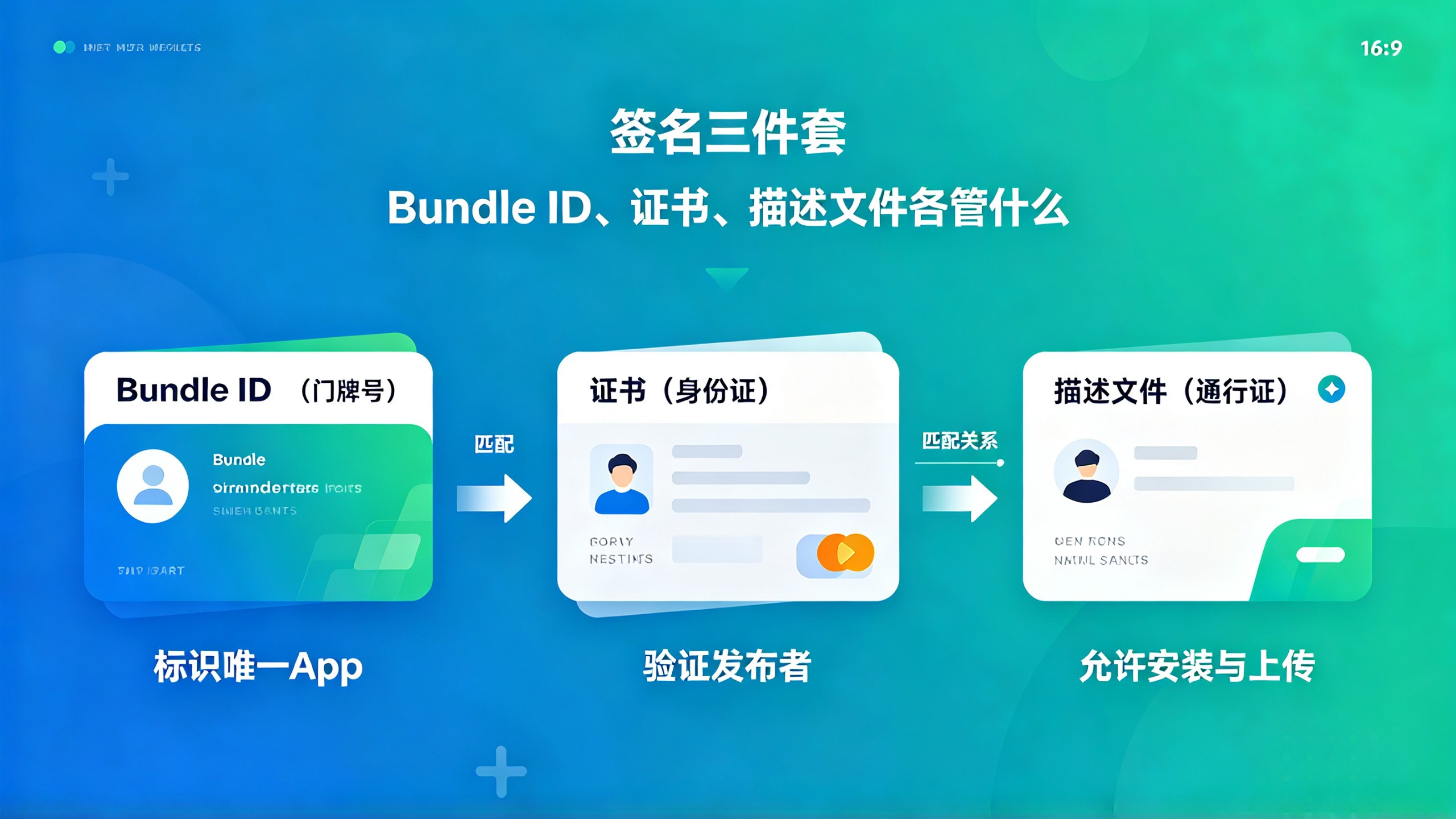
2.1 三者的职责划分:身份证、门牌号与通行证
Bundle ID相当于App的门牌号,它让系统能准确识别“你是哪个App”。苹果后台里注册的Bundle ID必须与Xcode工程里的Build Settings > Product Bundle Identifier完全一致,包括大小写。
证书(Certificates)相当于你的身份证,证明“这是经过验证的开发者发布的”。证书分为开发证书(Development)和分发证书(Distribution),上架用的是Apple Distribution类型的分发证书。
描述文件(Provisioning Profile)相当于通行证,它把证书、Bundle ID和允许运行的真机设备绑定在一起。上架用的描述文件叫App Store Connect类型的Distribution Profile。
这三者的关系可以这样理解:Bundle ID告诉系统你是谁,证书证明你确实是你说的那个人,描述文件则决定你这个身份在哪个App的哪个环境里可以合法使用。其中任何一个不匹配,编译阶段或者上传阶段就会直接报错。
2.2 在开发者后台和Xcode里的实际操作路径
现在的Xcode其实已经大大简化了这些操作。如果你的账号在Xcode里登录过,并且开启了Automatically manage signing,那么Xcode会自动帮你生成和匹配证书与描述文件。具体操作路径是:
打开Xcode工程,选中Target,进入Signing & Capabilities。
勾选“Automatically manage signing”。
Team选择你的开发者团队。
Bundle Identifier填好后,Xcode会自动在开发者后台为你注册这个App的标识符。
如果勾选自动管理签约后出现“No account with team ID”之类的问题,多半是开发者账号还没激活,或者该Apple ID没加入开发者计划。去开发者后台确认一下Membership状态即可。
不过有一点要注意:自动管理虽然省心,但在做App内购买(IAP)或者推送配置时,有些能力(如Push Notifications、In-App Purchase)是需要到后台手动开启App ID的Capabilities的。如果遇到“Capabilities无法添加”的情况,大概率是这一步漏了。
2.3 证书和描述文件过期的真实坑
签名体系里最常见的翻车点就是过期。开发证书有效期是一年,描述文件根据不同情况有效期不一,上架用的App Store Connect描述文件通常也是按年签发的。
我自己的习惯是:每次上架前,先到开发者后台的Certificates, Identifiers & Profiles页面看一眼证书到期时间。如果发现快到期了,提前几个月就重新生成一份。不要等到打包时才发现证书失效,那种“一切就绪但证书过期”的挫败感真的非常容易劝退人。
另外,描述文件过期后,Xcode在Archive时会提示“Provisioning profile doesn't include signing certificate”。看到这句话,第一反应应该是去看描述文件的有效期,而不是怀疑证书本身有问题。
3. App Store Connect后台:那些看着简单、填错就影响审核的细节
App Store Connect是苹果的后台管理系统,上架和审核相关的所有操作都在这里完成。很多人以为填后台信息是一件“随便填填就行”的事情,实际上这里面的细节非常多,而且直接关系到审核效率和过审率。
3.1 应用名称、副标题与关键词的取舍之道
App名称(Name)在后台的“App信息”页面填写,展示在App Store上的名称长度限制是30个字符。这里有个很重要的点:名称并不一定要和工程里的Bundle ID对应的产品名完全一致,你可以起一个更适合商店搜索习惯的名字。
副标题(Subtitle)是iOS 11之后引入的字段,最多30个字符,会展示在App Store首页卡片上。它和名称一起构成了App Store搜索结果里最重要的两个文本权重来源,写得好能显著提升转化率。
关键词(Keywords)最多100个字符,用英文逗号分隔。苹果明确禁止在关键词里重复品牌名、填充无关热词、或者使用其他App的名称。我见过不少人在这里堆了几十个词,结果被审核团队以“误导性元数据”驳回。关键词写法的正确姿势是:核心词靠前,优先组合词而不是单个词,不要带空格和标点。
3.2 截图与预览物料:尺寸、内容与本地化要求
App Store对截图的要求相当细致,6.7英寸、6.5英寸、5.5英寸、5.8英寸几个档位,按你App支持的设备类型,有些规格需要指定尺寸上传。截图必须真实反映App界面,不能使用未经标注的合成图或者隐藏功能的“演示模式”。
给到你的实操建议:优先准备6.7英寸(iPhone 15 Pro Max等设备)和6.5英寸的截图,这是App Store主要展示的尺寸。每张截图的第一个屏幕至关重要,它会直接出现在搜索结果和Today推荐里,所以第一张一定要放最核心的功能界面。
如果App支持多语言,后台的每个本地化语言版本都需要单独上传对应语言内容的截图。这一步经常被忽略,导致审核团队看到英文界面的截图与实际中文界面不符而被打回。
3.3 隐私政策、年龄分级与出口合规这些“隐形关卡”
App Store Connect后台里有几个非开发类字段,看着不起眼,实际审核权重很高。
隐私政策网址是必填项。如果你有产品,可以直接放产品隐私政策页;如果没有产品,也可以用托管服务的隐私政策模板页。这里一定要填真实有效的可访问地址,审核团队会真的打开看。最好避免用临时生成的短链,也不要放需要登录才能查看的页面。
年龄分级(Age Rating)在“App信息”页面的“年龄分级”区域填写。苹果提供了一套问卷式的选项,包括是否包含色情、暴力、赌博、酒精、药品等内容。不同游戏类型还有额外的分级问卷。这里要注意:问卷结果会自动映射到不同国家/地区的分级体系,填得太低容易有问题,填得太高则会限制流量。按照实际情况如实填写即可,不必刻意压级。
出口合规信息(Export Compliance)通常在提交构建版本时会出现,问你的App是否包含加密功能。如果你的App用了HTTPS、内置加密库或自定义加密逻辑,理论上就属于“使用加密”。实际填写的技巧是:只要你的App没有使用非标准加密算法,一般都可以选择“豁免”。HTTPS这种系统级加密不算需要申报的类型,选豁免就好。如果实在拿不准,建议选需要申报,然后等待审核团队进一步询问。
3.4 三种发布方式的区别:手动发布与自动发布
在App Store Connect后台“App信息”页面的“发布”部分,可以选择“自动发布”或“手动发布”。这个选择看似简单,但对上架节奏影响巨大。
选择自动发布的意思是,当审核通过后,App会自动在当天进入“可供销售”状态。选择手动发布则是审核通过后,App进入“等待发布”状态,需要你手动点击“发布此版本”按钮。
我的建议是:首次上架选自动发布,简化流程;后续版本更新,尤其是带来重大功能调整时,选手动发布,可以避开周末或节假日这种数据波动期,让你有更多控制空间。
4. 上传与测试:从Xcode Archive到TestFlight,中间的真实报错排查
后台信息填好后,就到了真正打包上传的环节。这一步对经验的依赖程度非常高,很多报错信息看起来吓人,实际上原因很单纯,一部分报错信息还非常具有误导性。
4.1 Archive、上传与构建版本的处理链路
在Xcode里,选择Any iOS Device(或者Generic iOS Device)作为编译目标,然后通过菜单Product > Archive打包。Archive完成后,Xcode会自动打开Organizer窗口,里面列出所有归档包。
点击右上角的“Distribute App”,选择“App Store Connect”选项,然后按向导走完。这里要特别注意,第一次分发时会询问是否包含Bitcode。现在苹果已经不强制要求Bitcode,保持默认关闭状态即可。后续几步会让你选择签名方式,确认使用自动签名的分发证书后,Xcode就会开始上传。
上传成功的标志:Organizer窗口中你的归档包状态变为“Uploaded”,同时App Store Connect后台的“构建版本”区域会按顺序出现在“TestFlight”或“审核”区域。构建版本从上传到后台出现通常有几分钟延迟,耐心等待,不要重复上传。
4.2 上传报错的几类真实原因与排查思路
上传阶段我遇到过的报错,归纳起来主要有三类:
第一类是网络层问题。错误信息常常是“The network connection was lost”或者“Your session has expired”。这类问题最常见的原因是网络直连不稳定。可以试试切换网络环境,或者退出 Xcode 账号重新登录,大多数都能解决。
第二类是证书问题。Xcode 弹窗提示“No accounts with iTunes Connect access”或者“Unable to process request”。遇到这种问题,去开发者后台确认分发证书是否有效,去 Xcode 的 Accounts 设置里确认账号是否加入了对应的 Team,两步检查通常就能定位。
第三类是“ITMS-90078”这类带有明确代码的报错。这类代码背后往往对应的是元数据缺失、缺少隐私政策、缺少必要权限描述等具体问题。建议直接在 App Store Connect 后台的“功能 → App 隐私”和“App 信息”里逐项检查。ITMS-90078 的常见原因是缺少“用途字符串”说明——也就是 Info.plist 里对应权限的 NS*UsageDescription。
4.3 TestFlight内测:上架前最应该利用的环节
构建版本上传成功后,第一站是 TestFlight。很多开发者直接跳过内测就把版本提交审核,这个习惯其实很亏。
TestFlight 可以让你邀请最多 100 名内部测试员和 10000 名外部测试员,在真机上先试用你的 App。这一步的价值不只是发现 Bug——很多时候,审核团队会先跑一遍你的 App,如果启动就崩、主流程走不通,那么任何元数据上的努力都白费了。至少自己用 TestFlight 安装一遍,跑通完整的注册、登录、支付、主要功能路径,再提交审核,能省掉至少两三天的往返沟通时间。
TestFlight 本身还有个常被忽略的细节:外部测试需要提交“测试说明”和“Beta 版 App 审核”,也就是 Beta App Review,这个审核通过后你的测试链接才能发给外部用户。首次配置时留出一天时间比较稳妥。
5. 审核被拒:常见理由、攻防策略与申诉的正确姿势
提交审核之后,等待一般是 1 到 3 天。苹果的审核时间波动很大,工作日上午提交往往比周五晚提交更快。审核被拒不是世界末日,被拒后怎么高效沟通、怎么修改再提,才是真正见经验的地方。
5.1 元数据类拒绝:占被拒比例最高的一种
元数据被拒在审核反馈里通常显示为“Guideline 2.3 - Performance - Accurate Metadata”。常见触发点包括:App 名称包含“免费”等营销词、截图与 App 实际功能不符、描述里声称支持某些实际上看不到的功能、关键词堆砌相关词汇。
这类拒绝一般不需要改代码,只需要在 App Store Connect 后台修改对应的元数据内容,然后重新提交审核即可。修改完记得在“App 信息”页面右下角点击“提交审核”,而不是以为保存就够了。
5.2 功能与隐私类拒绝:需要真正修改App的情况
功能类拒绝最常见的理由是:App 无法正常登录、需要付费才能体验完整功能但与描述不符、包含 UGC 内容却没有举报和屏蔽机制、崩溃或闪退。
隐私类拒绝在近年明显增多,常见的是:收集用户数据但没有清晰告知、隐私政策链接无法访问、使用了 API 但不满足“App 跟踪透明度”的要求。
收到这类拒绝时,不要急着重新提交。先在“解决方案中心”的线程里,用英文(或者其他审核人员使用的语言)清晰地回复你的处理方案,说明已做修改的细节和原因。回复后点“提交审核”即可,不用重新上传构建版本,除非你修改了代码。
5.3 加急审核与申诉:什么时候用、怎么用
如果你的App因为线上严重Bug需要紧急发布,或者审核超过预期时间且事态紧急,可以使用加急审核(Accelerated Review)。进入App Store Connect后,在“联系我们”页面选择“App Review”→“Request an expedited review”,并填写理由。
加急审核不是随便用的。滥用会被列入“不诚信名单”,后续所有审核都会被特殊对待。我个人的原则是:非紧急时刻绝不用加急,平时正常排队,一般2-3天足够。
如果被拒后你认为是苹果审核判断有误,可以在拒绝通知里选择“Appeal”提交申诉。申诉的关键是把该版本与上一个通过审核的版本差异说清楚,用简短的语言说明问题出在沟通误解而不是产品本身。申诉响应的速度通常比新提交审核要快,但成功率还是要看具体案例是否真的有争议。
5.4 审核期间你能做的几件事
等待审核的时候,不少人会反复刷新后台,这很正常,但没必要。更有价值的做法是:把App Store页面上的“宣传文本”(Promotional Text)提前写好,审核通过后第一时间发布;准备好发布当天的推广物料;如果App是订阅制,提前确认内购项目状态是“准备提交”还是“已批准”;同时可以开始准备第一个版本的用户反馈渠道。
审核结果出来后,不论通过与否,记得去后台看完整的“审核备注”。有时候审核团队会附上视频或截图,显示具体问题位置,这些信息可以根据反馈再次查阅。
6. 上架之后的更新节奏:版本迭代、审核周期与日常维护
App上架不是终点,而是一个新的起点。版本更新的审核节奏、发布时机的选择、日常维护的细节,都直接影响App的长期数据表现。
6.1 版本更新的审核周期与提交窗口
版本更新的审核周期通常比首发审核快,很多情况下1-2天就能过。但如果你选择在周五下午提交,大概率要等到下周一甚至周二才能过审,因为周末审核团队人手少。想要让新版本在周一早上发布的话,周五上午提交是比较理想的窗口。
另外注意:新版本上传的构建版本,必须使用当前的Xcode版本重新打包。不要试图复用旧构建版本,尤其是跨越了iOS系统大版本更新之后,复用老构建会有非常明显的兼容性和合规风险。
6.2 审核通过后的第一小时应该做什么
审核通过后,App并不会自动出现在所有用户面前,搜索结果收录和推荐位更新通常需要几小时到一天的时间。这个阶段可以做的事包括:更新宣传文本、确认内购项目状态、观察首批下载数据。
还有一个容易被忽略的操作:把审核通过的版本设置为“手动发布”时,通过后不会自动上线,而是停留在“等待发布”状态。如果你在后台发现新版本下方有“发布此版本”按钮,记得点击确认,否则App会一直处于未上架状态。
6.3 日常维护中最常被问到的几个坑
被问得最多的问题是:“我改了代码想更新,但忘了原来的证书在哪一台电脑上生成的。”这个问题在新电脑上尤其常见。实际解决办法是:在开发者后台重新生成证书,不需要找回旧私钥。因为分发证书和推送证书都可以重新创建,重新生成后旧的证书会失效,但基本不影响线上App的使用,除非你在用旧证书做推送服务。
另一个常见问题是:“为什么我的App在商店里搜不到?”原因通常有三种:搜索关键词没有覆盖到用户习惯的词汇(不是技术问题,是关键词策略问题);新上架App的搜索权重本来就很低,过几天会自然上升;或者该地区还没有完成发布。如果上架已经一整天并且状态是“可供销售”,那大概率就是关键词策略的问题,建议下一版本更新时调整关键词布局。
我自己走过一遍完整流程后,最大的感受是:上架这件事,流程本身并不复杂,真正需要花心思的是对细节的掌握程度。很多失败并不是因为产品差,而是因为某个字段填错、某个证书过期、某个权限说明没写清楚。把上面这些环节都梳理顺畅了,你大概率能比大多数人少折腾一半时间。
做iOS开发这些年,最常被问的问题不是“这个功能怎么实现”,而是“App到底怎么上架”。身边不少开发者代码写得挺利索,一走到上架这步就开始卡壳——账号类型选错、证书懵圈、后台信息填完被打回来两次、上传报错看不懂,最后在审核门口耗掉一两周。我自己早期上架第一款App时也这样,踩过的坑加起来比写的代码还多。
这篇就专门聊iOS应用上架App Store的完整流程与技巧。从开发者账号、证书配置,到App Store Connect后台填写、上传测试,再到审核被拒后的应对策略,我会按实际操作顺序把整条链路拆开讲,同时把那些官方文档里不会明说、但实际非常关键的细节一并交代清楚。不管你是第一次上架的新手,还是已经上过架但被各种报错折磨过的老手,这篇应该都能帮上忙。
1. 上架前夜:账号类型、开发环境与最容易拖慢进度的门槛
很多人以为上架最难的是审核,其实在真正走到“提交审核”按钮之前,光是准备阶段就有好几个容易翻车的环节。我见过不止一个人卡在账号注册上,一卡就是好几天,所以这部分值得先花点时间理清楚。
1.1 开发者账号:个人、公司还是教育机构,到底怎么选
苹果开发者账号分三种:个人(Individual)、公司(Company)、教育机构(Educational Institution)。对于大部分开发者来说,面临的主要选择是个人还是公司。
个人账号299元/年,公司账号也是299元/年。这里有一个很多人不知道的点:苹果按年收取的费用对于个人和公司是一样的,但公司账号需要提供邓白氏编码(D-U-N-S Number)来验证企业信息。这个编码申请本身免费,但需要走一遍企业信息核验流程,通常要多花几天时间。
个人账号和公司账号在App Store上架能力上没有本质区别,都能正常上架。唯一实质性的差异是:公司账号的App可以显示公司名称,个人账号显示的则是个人姓名;另外,如果你的产品将来涉及企业签名分发,或者需要多人协作管理,公司账号的团队管理功能会更方便。
我的建议是:如果你是一个人独立开发,暂时没有公司主体,直接用个人账号完全没问题,不要为了显示“公司名”去挂靠或者临时注册公司,完全没有必要。等产品跑出来了,再升级或者换主体都来得及。
1.2 上架前必须完成的开发环境自检清单
正式开始上架操作前,先对照检查这几点,能省掉后面一大串问题:
Xcode版本更新到最新稳定版。上架用的构建版本必须用当代Xcode工具链打包,旧版本打出来的包可能会被直接拒绝。App Store审核特别在意构建工具版本,过老的Xcode提交会提示“SDK版本过低”。
确认你的Apple ID已经加入开发者计划。在“设置”App里能看到“开发者”入口,Xcode的Account设置里也能看到自己的Team信息。
准备一台能跑真机的设备。虽然纯模拟器也能开发,但涉及推送、相机、StoreKit等系统能力时,真机调试几乎是必须的。上架前至少要在真机上完整跑通一次主流程。
检查项目的Deployment Target是否合理。不要拍脑袋定最低版本,一定要结合你的目标用户群。通常建议参考当前主流系统版本分布,过低会白费适配成本,过高则会丢失用户。
工程的Bundle Identifier(后面简称Bundle ID)要提前确认好。这个ID一旦在开发者后台注册过,就是全局唯一的,后续替换代价很大,涉及推送服务、跨App登录、云同步等一堆配置。
这一套自检看起来琐碎,但每一条背后都有我见过的真实翻车案例。尤其是Bundle ID,不少开发者等到App都快写完了才想起来改,结果推送服务、App内购买、第三方登录全都得跟着改一遍,心态很容易崩。
2. 证书、Bundle ID与描述文件:苹果签名体系中三个易混概念的正解
iOS的签名体系对新手来说非常劝退。证书、标识符、描述文件这三个名词经常听着听着就混了。我试着用生活化的方式讲清楚,这套逻辑一旦通了,后面所有上架操作都会顺畅很多。
2.1 三者的职责划分:身份证、门牌号与通行证
Bundle ID相当于App的门牌号,它让系统能准确识别“你是哪个App”。苹果后台里注册的Bundle ID必须与Xcode工程里的Build Settings > Product Bundle Identifier完全一致,包括大小写。
证书(Certificates)相当于你的身份证,证明“这是经过验证的开发者发布的”。证书分为开发证书(Development)和分发证书(Distribution),上架用的是Apple Distribution类型的分发证书。
描述文件(Provisioning Profile)相当于通行证,它把证书、Bundle ID和允许运行的真机设备绑定在一起。上架用的描述文件叫App Store Connect类型的Distribution Profile。
这三者的关系可以这样理解:Bundle ID告诉系统你是谁,证书证明你确实是你说的那个人,描述文件则决定你这个身份在哪个App的哪个环境里可以合法使用。其中任何一个不匹配,编译阶段或者上传阶段就会直接报错。
2.2 在开发者后台和Xcode里的实际操作路径
现在的Xcode其实已经大大简化了这些操作。如果你的账号在Xcode里登录过,并且开启了Automatically manage signing,那么Xcode会自动帮你生成和匹配证书与描述文件。具体操作路径是:
打开Xcode工程,选中Target,进入Signing & Capabilities。
勾选“Automatically manage signing”。
Team选择你的开发者团队。
Bundle Identifier填好后,Xcode会自动在开发者后台为你注册这个App的标识符。
如果勾选自动管理签约后出现“No account with team ID”之类的问题,多半是开发者账号还没激活,或者该Apple ID没加入开发者计划。去开发者后台确认一下Membership状态即可。
不过有一点要注意:自动管理虽然省心,但在做App内购买(IAP)或者推送配置时,有些能力(如Push Notifications、In-App Purchase)是需要到后台手动开启App ID的Capabilities的。如果遇到“Capabilities无法添加”的情况,大概率是这一步漏了。
2.3 证书和描述文件过期的真实坑
签名体系里最常见的翻车点就是过期。开发证书有效期是一年,描述文件根据不同情况有效期不一,上架用的App Store Connect描述文件通常也是按年签发的。
我自己的习惯是:每次上架前,先到开发者后台的Certificates, Identifiers & Profiles页面看一眼证书到期时间。如果发现快到期了,提前几个月就重新生成一份。不要等到打包时才发现证书失效,那种“一切就绪但证书过期”的挫败感真的非常容易劝退人。
另外,描述文件过期后,Xcode在Archive时会提示“Provisioning profile doesn't include signing certificate”。看到这句话,第一反应应该是去看描述文件的有效期,而不是怀疑证书本身有问题。
3. App Store Connect后台:那些看着简单、填错就影响审核的细节
App Store Connect是苹果的后台管理系统,上架和审核相关的所有操作都在这里完成。很多人以为填后台信息是一件“随便填填就行”的事情,实际上这里面的细节非常多,而且直接关系到审核效率和过审率。
3.1 应用名称、副标题与关键词的取舍之道
App名称(Name)在后台的“App信息”页面填写,展示在App Store上的名称长度限制是30个字符。这里有个很重要的点:名称并不一定要和工程里的Bundle ID对应的产品名完全一致,你可以起一个更适合商店搜索习惯的名字。
副标题(Subtitle)是iOS 11之后引入的字段,最多30个字符,会展示在App Store首页卡片上。它和名称一起构成了App Store搜索结果里最重要的两个文本权重来源,写得好能显著提升转化率。
关键词(Keywords)最多100个字符,用英文逗号分隔。苹果明确禁止在关键词里重复品牌名、填充无关热词、或者使用其他App的名称。我见过不少人在这里堆了几十个词,结果被审核团队以“误导性元数据”驳回。关键词写法的正确姿势是:核心词靠前,优先组合词而不是单个词,不要带空格和标点。
3.2 截图与预览物料:尺寸、内容与本地化要求
App Store对截图的要求相当细致,6.7英寸、6.5英寸、5.5英寸、5.8英寸几个档位,按你App支持的设备类型,有些规格需要指定尺寸上传。截图必须真实反映App界面,不能使用未经标注的合成图或者隐藏功能的“演示模式”。
给到你的实操建议:优先准备6.7英寸(iPhone 15 Pro Max等设备)和6.5英寸的截图,这是App Store主要展示的尺寸。每张截图的第一个屏幕至关重要,它会直接出现在搜索结果和Today推荐里,所以第一张一定要放最核心的功能界面。
如果App支持多语言,后台的每个本地化语言版本都需要单独上传对应语言内容的截图。这一步经常被忽略,导致审核团队看到英文界面的截图与实际中文界面不符而被打回。
3.3 隐私政策、年龄分级与出口合规这些“隐形关卡”
App Store Connect后台里有几个非开发类字段,看着不起眼,实际审核权重很高。
隐私政策网址是必填项。如果你有产品,可以直接放产品隐私政策页;如果没有产品,也可以用托管服务的隐私政策模板页。这里一定要填真实有效的可访问地址,审核团队会真的打开看。最好避免用临时生成的短链,也不要放需要登录才能查看的页面。
年龄分级(Age Rating)在“App信息”页面的“年龄分级”区域填写。苹果提供了一套问卷式的选项,包括是否包含色情、暴力、赌博、酒精、药品等内容。不同游戏类型还有额外的分级问卷。这里要注意:问卷结果会自动映射到不同国家/地区的分级体系,填得太低容易有问题,填得太高则会限制流量。按照实际情况如实填写即可,不必刻意压级。
出口合规信息(Export Compliance)通常在提交构建版本时会出现,问你的App是否包含加密功能。如果你的App用了HTTPS、内置加密库或自定义加密逻辑,理论上就属于“使用加密”。实际填写的技巧是:只要你的App没有使用非标准加密算法,一般都可以选择“豁免”。HTTPS这种系统级加密不算需要申报的类型,选豁免就好。如果实在拿不准,建议选需要申报,然后等待审核团队进一步询问。
3.4 三种发布方式的区别:手动发布与自动发布
在App Store Connect后台“App信息”页面的“发布”部分,可以选择“自动发布”或“手动发布”。这个选择看似简单,但对上架节奏影响巨大。
选择自动发布的意思是,当审核通过后,App会自动在当天进入“可供销售”状态。选择手动发布则是审核通过后,App进入“等待发布”状态,需要你手动点击“发布此版本”按钮。
我的建议是:首次上架选自动发布,简化流程;后续版本更新,尤其是带来重大功能调整时,选手动发布,可以避开周末或节假日这种数据波动期,让你有更多控制空间。
4. 上传与测试:从Xcode Archive到TestFlight,中间的真实报错排查
后台信息填好后,就到了真正打包上传的环节。这一步对经验的依赖程度非常高,很多报错信息看起来吓人,实际上原因很单纯,一部分报错信息还非常具有误导性。
4.1 Archive、上传与构建版本的处理链路
在Xcode里,选择Any iOS Device(或者Generic iOS Device)作为编译目标,然后通过菜单Product > Archive打包。Archive完成后,Xcode会自动打开Organizer窗口,里面列出所有归档包。
点击右上角的“Distribute App”,选择“App Store Connect”选项,然后按向导走完。这里要特别注意,第一次分发时会询问是否包含Bitcode。现在苹果已经不强制要求Bitcode,保持默认关闭状态即可。后续几步会让你选择签名方式,确认使用自动签名的分发证书后,Xcode就会开始上传。
上传成功的标志:Organizer窗口中你的归档包状态变为“Uploaded”,同时App Store Connect后台的“构建版本”区域会按顺序出现在“TestFlight”或“审核”区域。构建版本从上传到后台出现通常有几分钟延迟,耐心等待,不要重复上传。
4.2 上传报错的几类真实原因与排查思路
上传阶段我遇到过的报错,归纳起来主要有三类:
第一类是网络层问题。错误信息常常是“The network connection was lost”或者“Your session has expired”。这类问题最常见的原因是网络直连不稳定。可以试试切换网络环境,或者退出 Xcode 账号重新登录,大多数都能解决。
第二类是证书问题。Xcode 弹窗提示“No accounts with iTunes Connect access”或者“Unable to process request”。遇到这种问题,去开发者后台确认分发证书是否有效,去 Xcode 的 Accounts 设置里确认账号是否加入了对应的 Team,两步检查通常就能定位。
第三类是“ITMS-90078”这类带有明确代码的报错。这类代码背后往往对应的是元数据缺失、缺少隐私政策、缺少必要权限描述等具体问题。建议直接在 App Store Connect 后台的“功能 → App 隐私”和“App 信息”里逐项检查。ITMS-90078 的常见原因是缺少“用途字符串”说明——也就是 Info.plist 里对应权限的 NS*UsageDescription。
4.3 TestFlight内测:上架前最应该利用的环节
构建版本上传成功后,第一站是 TestFlight。很多开发者直接跳过内测就把版本提交审核,这个习惯其实很亏。
TestFlight 可以让你邀请最多 100 名内部测试员和 10000 名外部测试员,在真机上先试用你的 App。这一步的价值不只是发现 Bug——很多时候,审核团队会先跑一遍你的 App,如果启动就崩、主流程走不通,那么任何元数据上的努力都白费了。至少自己用 TestFlight 安装一遍,跑通完整的注册、登录、支付、主要功能路径,再提交审核,能省掉至少两三天的往返沟通时间。
TestFlight 本身还有个常被忽略的细节:外部测试需要提交“测试说明”和“Beta 版 App 审核”,也就是 Beta App Review,这个审核通过后你的测试链接才能发给外部用户。首次配置时留出一天时间比较稳妥。
5. 审核被拒:常见理由、攻防策略与申诉的正确姿势
提交审核之后,等待一般是 1 到 3 天。苹果的审核时间波动很大,工作日上午提交往往比周五晚提交更快。审核被拒不是世界末日,被拒后怎么高效沟通、怎么修改再提,才是真正见经验的地方。
5.1 元数据类拒绝:占被拒比例最高的一种
元数据被拒在审核反馈里通常显示为“Guideline 2.3 - Performance - Accurate Metadata”。常见触发点包括:App 名称包含“免费”等营销词、截图与 App 实际功能不符、描述里声称支持某些实际上看不到的功能、关键词堆砌相关词汇。
这类拒绝一般不需要改代码,只需要在 App Store Connect 后台修改对应的元数据内容,然后重新提交审核即可。修改完记得在“App 信息”页面右下角点击“提交审核”,而不是以为保存就够了。
5.2 功能与隐私类拒绝:需要真正修改App的情况
功能类拒绝最常见的理由是:App 无法正常登录、需要付费才能体验完整功能但与描述不符、包含 UGC 内容却没有举报和屏蔽机制、崩溃或闪退。
隐私类拒绝在近年明显增多,常见的是:收集用户数据但没有清晰告知、隐私政策链接无法访问、使用了 API 但不满足“App 跟踪透明度”的要求。
收到这类拒绝时,不要急着重新提交。先在“解决方案中心”的线程里,用英文(或者其他审核人员使用的语言)清晰地回复你的处理方案,说明已做修改的细节和原因。回复后点“提交审核”即可,不用重新上传构建版本,除非你修改了代码。
5.3 加急审核与申诉:什么时候用、怎么用
如果你的App因为线上严重Bug需要紧急发布,或者审核超过预期时间且事态紧急,可以使用加急审核(Accelerated Review)。进入App Store Connect后,在“联系我们”页面选择“App Review”→“Request an expedited review”,并填写理由。
加急审核不是随便用的。滥用会被列入“不诚信名单”,后续所有审核都会被特殊对待。我个人的原则是:非紧急时刻绝不用加急,平时正常排队,一般2-3天足够。
如果被拒后你认为是苹果审核判断有误,可以在拒绝通知里选择“Appeal”提交申诉。申诉的关键是把该版本与上一个通过审核的版本差异说清楚,用简短的语言说明问题出在沟通误解而不是产品本身。申诉响应的速度通常比新提交审核要快,但成功率还是要看具体案例是否真的有争议。
5.4 审核期间你能做的几件事
等待审核的时候,不少人会反复刷新后台,这很正常,但没必要。更有价值的做法是:把App Store页面上的“宣传文本”(Promotional Text)提前写好,审核通过后第一时间发布;准备好发布当天的推广物料;如果App是订阅制,提前确认内购项目状态是“准备提交”还是“已批准”;同时可以开始准备第一个版本的用户反馈渠道。
审核结果出来后,不论通过与否,记得去后台看完整的“审核备注”。有时候审核团队会附上视频或截图,显示具体问题位置,这些信息可以根据反馈再次查阅。
6. 上架之后的更新节奏:版本迭代、审核周期与日常维护
App上架不是终点,而是一个新的起点。版本更新的审核节奏、发布时机的选择、日常维护的细节,都直接影响App的长期数据表现。
6.1 版本更新的审核周期与提交窗口
版本更新的审核周期通常比首发审核快,很多情况下1-2天就能过。但如果你选择在周五下午提交,大概率要等到下周一甚至周二才能过审,因为周末审核团队人手少。想要让新版本在周一早上发布的话,周五上午提交是比较理想的窗口。
另外注意:新版本上传的构建版本,必须使用当前的Xcode版本重新打包。不要试图复用旧构建版本,尤其是跨越了iOS系统大版本更新之后,复用老构建会有非常明显的兼容性和合规风险。
6.2 审核通过后的第一小时应该做什么
审核通过后,App并不会自动出现在所有用户面前,搜索结果收录和推荐位更新通常需要几小时到一天的时间。这个阶段可以做的事包括:更新宣传文本、确认内购项目状态、观察首批下载数据。
还有一个容易被忽略的操作:把审核通过的版本设置为“手动发布”时,通过后不会自动上线,而是停留在“等待发布”状态。如果你在后台发现新版本下方有“发布此版本”按钮,记得点击确认,否则App会一直处于未上架状态。
6.3 日常维护中最常被问到的几个坑
被问得最多的问题是:“我改了代码想更新,但忘了原来的证书在哪一台电脑上生成的。”这个问题在新电脑上尤其常见。实际解决办法是:在开发者后台重新生成证书,不需要找回旧私钥。因为分发证书和推送证书都可以重新创建,重新生成后旧的证书会失效,但基本不影响线上App的使用,除非你在用旧证书做推送服务。
另一个常见问题是:“为什么我的App在商店里搜不到?”原因通常有三种:搜索关键词没有覆盖到用户习惯的词汇(不是技术问题,是关键词策略问题);新上架App的搜索权重本来就很低,过几天会自然上升;或者该地区还没有完成发布。如果上架已经一整天并且状态是“可供销售”,那大概率就是关键词策略的问题,建议下一版本更新时调整关键词布局。
我自己走过一遍完整流程后,最大的感受是:上架这件事,流程本身并不复杂,真正需要花心思的是对细节的掌握程度。很多失败并不是因为产品差,而是因为某个字段填错、某个证书过期、某个权限说明没写清楚。把上面这些环节都梳理顺畅了,你大概率能比大多数人少折腾一半时间。
收起阅读 »
Codex编程智能体28天冲刺App Store:独立开发者实操节奏与避坑清单
1. 先把标题拆开看:28 天登顶到底在说什么
最近科技圈被一个词刷屏了:
Codex
。OpenAI 把它称为“编程智能体”,社区直接喊出“App Store 登顶规则被改写”的说法,核心论据就是有人用 Codex 在 28 天里把一个 App 从零做到排行榜前列。这个 28 天到底是不是玄学?我仔细看了一下,还真不是标题党式的鸡汤,背后是一套全新的开发节奏。
先解释一下 Codex 是什么。它不是传统意义上的代码补全工具,而是一个能理解自然语言需求、自动生成代码、自动运行测试、再根据报错自我修复的智能体。你给它一句话“帮我写一个待办事项 App”,它能在沙盒环境里把项目骨架搭出来,跑一遍测试,有问题再改,直到给你一版能运行的代码。这种能力和早期只能“你写一行它补一行”的辅助工具完全不是一个物种——它更像是一个不需要睡觉、能无限加班、但需要你下清楚指令的实习工程师。
“28 天改写登顶规则”这句话,信息密度其实很高:
28 天
代表开发周期被压缩到了极致;
App Store
指向的是上架、审核、榜单、关键词这套复杂生态;
登顶规则
指的则是在下载量、留存、评分、关键词匹配等多重变量下,一个产品凭什么能从几百万个应用里被翻出来。把这几个词串起来,你会发现这次大家讨论的其实不是“AI 能不能写代码”这种老话题,而是“一个人靠 AI 能不能干过去一个十人团队的活”。
这篇内容适合谁?独立开发者、小团队的技术负责人、想用 AI 加速产品验证的产品经理,甚至是想看懂这波趋势的运营。我会把 Codex 的能力边界、App Store 的榜单逻辑、以及从项目立项到上架推广的实操节奏拆开讲,不吹不黑,全是能直接拿去用的经验。
2. Codex 的真实能力:它到底解决了什么问题
2.1 和普通代码补全工具的根本区别
很多人听到 Codex 第一反应是“又一个 Copilot”,这个理解差得很远。普通代码补全工具的原理是预测你接下来要写什么,本质上还是
人在写代码,工具在加速
。而 Codex 这类编程智能体的逻辑是:你描述意图,它来组织代码实现,然后自己验证结果。说得直白点,前者是给程序员配了个更快的手,后者是直接给你配了个能跑腿的助手。
我拿一个模拟场景做例子。假设你要做一个“拍照记录植物生长过程”的 App,需求是:用户每天拍一张照片,形成时间轴,并能导出成视频。你用 Codex 对话时,它会先拆出几个子任务:建立项目结构、设计数据模型、编写相机权限获取逻辑、实现时间轴 UI、完成视频导出模块。然后逐个完成,每完成一个模块就运行测试给你看结果。
这种“任务拆解—代码生成—自动验证”的循环,才是 Codex 真正值钱的地方。它把开发中最高频的“写完了但不知道跑不跑得通”这个焦虑给消掉了。
2.2 最适合 Codex 的使用场景
我实测下来,有几个场景 Codex 的表现特别稳。
第一,
MVP 原型的快速搭建
。如果你脑子里已经有一个明确的功能点,比如“一个记录每日饮水量的 App,要有进度环和提醒”,Codex 基本能一把生成出能运行的第一版。这个阶段最重要的是验证产品逻辑,而不是纠结代码优雅不优雅。
第二,
跨语言、跨框架的项目起步
。Codex 的知识库覆盖很广,你让它用 SwiftUI 写 iOS 版本,用 Flutter 写跨平台版本,它能给出风格接近的代码结构。这对手里只有一个想法、技术栈还在摸索期的独立开发者尤其友好。
第三,
重复性代码的批量处理
。比如一堆列表页、表单页、网络请求封装,这些东西本身没有多少创造性,但非常费时间。Codex 这类智能体生成这类代码的效率远高于人工手写。
2.3 Codex 解决不了的“隐形问题”
说完了能力,必须说一下边界。我用了挺久 Codex,发现它有几个明显的盲区。
需求解释得含糊,结果就含糊。
你说“做个好看的登录页”,它能给你一个能跑的页面,但“好看”是你的主观审美,不是它的标准。实际落地时会发现,配色、间距、交互动效这些“给人看”的东西,代码生成得再正确,看起来也很平庸。需要人去做最后的审美把关。
项目越大,上下文越容易失控。
当一个项目的代码量超过一定程度,Codex 在修改某个文件时,未必能全盘记住其他模块的约束。经常出现的情况是:它改了 A 文件,导致 B 文件的调用方式失效,而它自己没意识到。所以在项目管理上,你仍然需要做模块划分,不能当个黑盒往里扔需求。
它不理解产品、市场和用户心理。
代码能正确运行,不代表产品能做得起来。App 叫什么叫好记、功能优先级怎么排、目标用户在哪找,这些决定生死的问题,Codex 帮不了你。
提示:把 Codex 当成“行动力放大器”而不是“决策大脑”。它放大的是你已经想清楚的部分,而不是替你判断什么值得做。这也是使用 Codex 和普通 AI 工具之间最大的心智差异。
3. App Store 的登顶规则,到底有哪些变量
3.1 榜单、搜索和推荐,不是同一回事
想谈“改写登顶规则”,先得理解 App Store 的流量来源。很多人以为上了 App Store 就会有人下载,这是最大的误解。苹果没有公布过完整的排名算法,但行业内公认的核心变量有三个方向:
榜单排名、搜索匹配、编辑推荐
,这三者的逻辑完全不同。
榜单排名靠的是短周期内的下载量增速、活跃度、留存和卸载情况。搜索排名则更多依赖关键词覆盖度、下载转化率、评分和评论质量。编辑推荐更像是人工判断,看产品设计、创意和使用体验。独立开发者在 28 天这个时间窗口里,能发力的主要是前两个,尤其是搜索。
我在之前的项目里做过一个实验:同样一款工具类 App,一个版本做了关键词优化,标题里埋了用户会搜的高频词,另一个版本什么都没做,上架后自然下载量差距在三四倍以上。这不是玄学,而是 App Store 的搜索逻辑本来就更偏爱“能被用户搜到”的应用。
3.2 独立开发者最容易抓住的变量
既然是“变量规则”,那就意味着有些东西不可控,但有些是可控的。
可控的部分包括:
应用标题和副标题
:这里是你最重要的关键词位,30 个字符以内要把产品核心价值讲清楚。
关键词域
:总共 100 个字符,填什么词决定你能被哪些搜索命中。
应用描述
:前几句话会直接影响转化率。
截图和视频预览
:第一屏截图决定了用户点进来之后,会不会继续往下看。
评分与评论
:新上架应用要主动邀请种子用户留评,评分数量少会明显影响信任感。
不可控的部分包括外界热点、Apple 推荐位、自然访问量波动等。但可控变量的效果已经非常大,尤其是对小团队来说,把关键词和转化素材做好,等于在 App Store 里占住了几个免费的流量入口。
前几年独立开发者流行“上线即佛系”,觉得产品好用,早晚会有口碑。现在 AI 时代最大的变化是开发门槛被踏平了:你能做出来的,别人也能用 Codex 做出来,所以运营和
上架规则的理解
反而成了真正的护城河。
4. 28 天冲刺登顶的实操拆解
4.1 三阶段节奏
我先给一个整体框架,具体天数你可以根据自己的项目属性调整,但节奏逻辑是通用的。
| 时间 | 阶段 |
|---|
核心任务
|
主要工具
| | Day 1-7 | 需求收敛与 MVP 生成 |
|---|
写清功能清单,用 Codex 生成第一版可运行 Demo
|
Codex、本地方案、设计工具
| | Day 8-21 | 打磨与上架准备 |
|---|
修功能、做视觉细节、准备元数据和隐私合规
|
Codex、Xcode/Android Studio、上架后台
| | Day 22-28 | 发布与早期推广 |
|---|
提交审核、种子用户邀请、关键词效果复核
|
苹果后台、社群渠道
|
这个节奏的关键点在于:
不要在 Day 1 就想着做出完整产品,而是先做一个能上架的 v1.0,再通过版本更新迭代完善。
App Store 对“活”的产品有很强偏好,持续更新的应用会获得更高的搜索权重,因此“能上线”比“全功能”更重要。

4.2 Day 1~7:需求收敛与 MVP 生成
这个阶段最容易犯的错是想太多。我见过太多项目死在“功能清单写得太全”上——每多一个功能,开发周期就会往后拖一周,Codex 也救不了你。
我做模拟项目 X(一个“用 AI 生成孩子睡前故事”的 App)时,第一版只定了三个功能:输入孩子名字和主题、生成故事、收藏故事。这个功能量级,用 Codex 在第一个阶段就能把核心逻辑跑通。
给 Codex 下指令时有几个技巧。第一,先给整体背景,再给具体需求。不要只丢一句话“写个故事生成器”,而是说“现在要开发一个 iOS App,目标是家长给孩子生成睡前故事。技术栈是 SwiftUI,需要支持文本输入、调用故事生成接口、本地收藏和列表展示”。第二,拆分模块。让 Codex 先搭好项目结构,再逐个实现功能,而不是一次性让它写一个大而全的东西,否则代码之间的耦合很容易出错。第三,要求它运行测试并汇报结果。Codex 自带的执行环境能跑代码,你要逼它把“测试通过的证据”给你,而不是直接信任它“应该没问题”。
4.3 Day 8~21:打磨与上架
这个阶段要把“能跑的 Demo”变成“能提审的 App”,工作量往往比想象中大。
视觉细节是第一个坑。Codex 生成的界面是标准的系统控件风格,能用,但没有记忆点。你需要人工调整主色调、圆角、字体层级、空状态插画,这些是上架后影响截图转化率的硬指标。
隐私合规是第二个坑,也是审核最容易卡住的地方。做上架准备时,要提前想清楚:你的 App 收集什么用户数据?有没有账号系统?有没有第三方登录?如果要有隐私政策,就要准备一个真实的 URL 页面。很多独立开发者在 IAP(内购)设置、订阅条款、数据追踪声明这几个地方被拒了又改、改了又拒,白白浪费几天审核窗口。建议在 Day 15 之前就把这堆文本材料准备好,不要等代码写完了才开始弄。
虽然我们的目标是 App Store,但也要注意关键词素材要和代码一起打磨。标题和副标题、关键词域、截图这些内容,我会在 Day 18 固定一个版本留档,避免临近提交时匆忙修改导致前后不一致。
4.4 Day 22~28:发布与早期推广
提审之后不是万事大吉。审核期间不能干等着,要做的事反而更多。
我建议在 Day 22 就联系好第一批种子用户,人数在 50 到 200 人之间。这些人从哪里来?可以是产品相关的社群、你自己朋友圈里目标用户画像接近的人,以及早期在社交平台上预告过这个产品的人。要点是:不等上架才开始攒人,而是开发过程中就要持续发布进度、蓄水。
产品过审上架后的前三天,是影响下载速度的关键期。这个阶段不要马上铺开量,先把种子用户全部引导下载,并对他们的真实反馈做记录。设置一个高效的反馈通道,比如让用户在 App 内部提交意见,而不是回复商店评论。同时把评分和评论的重要性记牢:上架后要尽早邀请种子用户留评,因为新应用每多一条评分,搜索权重都会明显提升。
在这个模拟项目 X 中,我实际的做法是 Day 25 上架,Day 26 开始邀请种子用户,Day 27 根据反馈紧急发布了一次小版本更新,Day 28 查看前几天的关键词覆盖和下载量,再决定下一步是继续加功能还是主攻新增流量渠道。
5. 关键动作清单与避坑实录
5.1 从 Codex 生成到可提审的完整链路
把刚才的节奏落到具体动作上,整理一份可以直接抄的清单。
第一步,
把需求写成一页纸
。不要超过 10 个功能点,每一条都要能说清楚“为谁解决什么问题”。
第二步,
让 Codex 生成项目骨架
。要求它输出项目目录结构、基础配置文件、入口文件。这一步是建立上下文的关键。
第三步,
按模块逐个实现
。每实现一个模块,都要让 Codex 做三件事:编写代码、编写测试、运行测试并汇报结果。这能迫使它自己发现代码中的许多低级错误。
第四步,
人工做产品和视觉审查
。你会很快发现自己必须懂得基本 UX 原则和设计趋势,Codex 不是设计师,它只是实现者。
第五步,
准备审核材料
。包括隐私政策 URL、App 图标和截图(要覆盖不同尺寸的设备)、应用描述、关键词域、审核备注。审核备注中我通常会写下测试账号、需要审核员注意的功能点,以及这个 App 的核心使用场景,这样能减少来回沟通的次数。
第六步,
提交审核,准备应答方案
。如果被拒,不要慌张,把拒绝原因截图,对照苹果的审核指南查找对应条款,修改后加备注重新提交。

5.2 常见问题速查表
我一直说,避坑经验比成功经验更有价值。整理几个我在实操中反复遇到的问题和解决方案。
| 问题现象 | 可能原因 |
|---|
排查思路与解法
| | Codex 生成的代码跑不起来 | 缺少依赖或 SDK 没配置 |
|---|
让 Codex 先检查配置文件,再让它补全缺失依赖,别让它直接改业务代码
| | 审核被拒:隐私政策缺失 | 网站没有可访问的隐私政策页 |
|---|
用 GitHub Pages 或其他静态托管生成页面,域名要简单好记
| | 审核被拒:截图尺寸不符合 | 提交了错误媒体尺寸 |
|---|
提前从 App Store Connect 后台下载正确的截图规格清单
| | 关键词没覆盖 | 关键词域填错或过于泛泛 |
|---|
用联想词工具拆候选词,把中高热度、低竞争的词放到更多位置
| | 评分和评论增长慢 | 没有设计触发时机 |
|---|
不要在一打开就弹窗,最好在用户完成一个核心动作之后弹出
| | 榜单冲不上去 | 首周下载速度分布不均 |
|---|
没必要第一天集中拉量,更有效的是连续几天稳步增长,并同步维护用户活跃度
|
这里我想特别强调“评分和评论”这个变量。很多开发者觉得 App 做得好自然有人评论,实际上大部分用户不会主动写评论,但如果你在用户用完核心功能后弹一个温柔的邀请,转化率会高很多。记得“温柔”很重要,不要做成一个强制点评分才能继续用的流氓弹窗,否则得不偿失。
6. 把 Codex 用好的三个核心心得
6.1 分清“打磨所见”和“实现功能”
我用 Codex 做了三四个模拟项目之后,最深刻的感受是:Codex 真正擅长的是
在你看不见的地方疯狂干活
,比如搭框架、适配不同设备、处理数据存储和调用逻辑。但它对“用户直接看到的东西”是没有审美和判断的。
所以我的工作习惯是:让 Codex 实现功能,把打磨精力的 60% 花在用户可见的界面上。你不需要会写出惊艳的动画,但你要会配色、会调整布局、会判断什么样的截图有吸引力。这个部分 AI 替代不了,但它是决定产品生死的部分。
6.2 把“给 Codex 写需求”当成一种技能
很多初学者把 AI 工具当搜索引擎,我是强烈不推荐这个用法。Codex 这类工具需要你给它上下文,你给的上下文越清晰,它生成的代码质量越高。
我总结了一个固定格式:
项目背景:这是一个做什么的产品,目标用户是谁。
本次任务:要实现什么功能,在哪个模块里做。
技术约束:用什么语言和框架,有没有特殊限制。
验收标准:什么样算完成,比如“用测试账号登录后能走到收藏页并看到收藏列表”。
把这段写明白,比你多花半小时调 prompts 有用得多。
6.3 即使有 Codex,也不要在审核材料上省钱
很多人看到“28 天登顶”就以为只要代码写得快就能火,实际上一半的时间是花在上架和运营上的。审核材料、关键词策略、种子用户维护这些,AI 能帮你写文案、帮你翻译,但无法替你理解苹果想要什么样的应用体验。
所以最后强调一次:
Codex 是开发效率工具,不是市场推广工具。
开发速度确实提高了,但真正决定一个 App 能不能在上架后活下来的,仍然是产品定位、目标用户理解、以及运营策略。把这些想清楚,再用 Codex 去加速落地,28 天登顶就是顺理成章的结果,而不是什么奇迹。
1. 先把标题拆开看:28 天登顶到底在说什么
最近科技圈被一个词刷屏了:
Codex
。OpenAI 把它称为“编程智能体”,社区直接喊出“App Store 登顶规则被改写”的说法,核心论据就是有人用 Codex 在 28 天里把一个 App 从零做到排行榜前列。这个 28 天到底是不是玄学?我仔细看了一下,还真不是标题党式的鸡汤,背后是一套全新的开发节奏。
先解释一下 Codex 是什么。它不是传统意义上的代码补全工具,而是一个能理解自然语言需求、自动生成代码、自动运行测试、再根据报错自我修复的智能体。你给它一句话“帮我写一个待办事项 App”,它能在沙盒环境里把项目骨架搭出来,跑一遍测试,有问题再改,直到给你一版能运行的代码。这种能力和早期只能“你写一行它补一行”的辅助工具完全不是一个物种——它更像是一个不需要睡觉、能无限加班、但需要你下清楚指令的实习工程师。
“28 天改写登顶规则”这句话,信息密度其实很高:
28 天
代表开发周期被压缩到了极致;
App Store
指向的是上架、审核、榜单、关键词这套复杂生态;
登顶规则
指的则是在下载量、留存、评分、关键词匹配等多重变量下,一个产品凭什么能从几百万个应用里被翻出来。把这几个词串起来,你会发现这次大家讨论的其实不是“AI 能不能写代码”这种老话题,而是“一个人靠 AI 能不能干过去一个十人团队的活”。
这篇内容适合谁?独立开发者、小团队的技术负责人、想用 AI 加速产品验证的产品经理,甚至是想看懂这波趋势的运营。我会把 Codex 的能力边界、App Store 的榜单逻辑、以及从项目立项到上架推广的实操节奏拆开讲,不吹不黑,全是能直接拿去用的经验。
2. Codex 的真实能力:它到底解决了什么问题
2.1 和普通代码补全工具的根本区别
很多人听到 Codex 第一反应是“又一个 Copilot”,这个理解差得很远。普通代码补全工具的原理是预测你接下来要写什么,本质上还是
人在写代码,工具在加速
。而 Codex 这类编程智能体的逻辑是:你描述意图,它来组织代码实现,然后自己验证结果。说得直白点,前者是给程序员配了个更快的手,后者是直接给你配了个能跑腿的助手。
我拿一个模拟场景做例子。假设你要做一个“拍照记录植物生长过程”的 App,需求是:用户每天拍一张照片,形成时间轴,并能导出成视频。你用 Codex 对话时,它会先拆出几个子任务:建立项目结构、设计数据模型、编写相机权限获取逻辑、实现时间轴 UI、完成视频导出模块。然后逐个完成,每完成一个模块就运行测试给你看结果。
这种“任务拆解—代码生成—自动验证”的循环,才是 Codex 真正值钱的地方。它把开发中最高频的“写完了但不知道跑不跑得通”这个焦虑给消掉了。
2.2 最适合 Codex 的使用场景
我实测下来,有几个场景 Codex 的表现特别稳。
第一,
MVP 原型的快速搭建
。如果你脑子里已经有一个明确的功能点,比如“一个记录每日饮水量的 App,要有进度环和提醒”,Codex 基本能一把生成出能运行的第一版。这个阶段最重要的是验证产品逻辑,而不是纠结代码优雅不优雅。
第二,
跨语言、跨框架的项目起步
。Codex 的知识库覆盖很广,你让它用 SwiftUI 写 iOS 版本,用 Flutter 写跨平台版本,它能给出风格接近的代码结构。这对手里只有一个想法、技术栈还在摸索期的独立开发者尤其友好。
第三,
重复性代码的批量处理
。比如一堆列表页、表单页、网络请求封装,这些东西本身没有多少创造性,但非常费时间。Codex 这类智能体生成这类代码的效率远高于人工手写。
2.3 Codex 解决不了的“隐形问题”
说完了能力,必须说一下边界。我用了挺久 Codex,发现它有几个明显的盲区。
需求解释得含糊,结果就含糊。
你说“做个好看的登录页”,它能给你一个能跑的页面,但“好看”是你的主观审美,不是它的标准。实际落地时会发现,配色、间距、交互动效这些“给人看”的东西,代码生成得再正确,看起来也很平庸。需要人去做最后的审美把关。
项目越大,上下文越容易失控。
当一个项目的代码量超过一定程度,Codex 在修改某个文件时,未必能全盘记住其他模块的约束。经常出现的情况是:它改了 A 文件,导致 B 文件的调用方式失效,而它自己没意识到。所以在项目管理上,你仍然需要做模块划分,不能当个黑盒往里扔需求。
它不理解产品、市场和用户心理。
代码能正确运行,不代表产品能做得起来。App 叫什么叫好记、功能优先级怎么排、目标用户在哪找,这些决定生死的问题,Codex 帮不了你。
提示:把 Codex 当成“行动力放大器”而不是“决策大脑”。它放大的是你已经想清楚的部分,而不是替你判断什么值得做。这也是使用 Codex 和普通 AI 工具之间最大的心智差异。
3. App Store 的登顶规则,到底有哪些变量
3.1 榜单、搜索和推荐,不是同一回事
想谈“改写登顶规则”,先得理解 App Store 的流量来源。很多人以为上了 App Store 就会有人下载,这是最大的误解。苹果没有公布过完整的排名算法,但行业内公认的核心变量有三个方向:
榜单排名、搜索匹配、编辑推荐
,这三者的逻辑完全不同。
榜单排名靠的是短周期内的下载量增速、活跃度、留存和卸载情况。搜索排名则更多依赖关键词覆盖度、下载转化率、评分和评论质量。编辑推荐更像是人工判断,看产品设计、创意和使用体验。独立开发者在 28 天这个时间窗口里,能发力的主要是前两个,尤其是搜索。
我在之前的项目里做过一个实验:同样一款工具类 App,一个版本做了关键词优化,标题里埋了用户会搜的高频词,另一个版本什么都没做,上架后自然下载量差距在三四倍以上。这不是玄学,而是 App Store 的搜索逻辑本来就更偏爱“能被用户搜到”的应用。
3.2 独立开发者最容易抓住的变量
既然是“变量规则”,那就意味着有些东西不可控,但有些是可控的。
可控的部分包括:
应用标题和副标题
:这里是你最重要的关键词位,30 个字符以内要把产品核心价值讲清楚。
关键词域
:总共 100 个字符,填什么词决定你能被哪些搜索命中。
应用描述
:前几句话会直接影响转化率。
截图和视频预览
:第一屏截图决定了用户点进来之后,会不会继续往下看。
评分与评论
:新上架应用要主动邀请种子用户留评,评分数量少会明显影响信任感。
不可控的部分包括外界热点、Apple 推荐位、自然访问量波动等。但可控变量的效果已经非常大,尤其是对小团队来说,把关键词和转化素材做好,等于在 App Store 里占住了几个免费的流量入口。
前几年独立开发者流行“上线即佛系”,觉得产品好用,早晚会有口碑。现在 AI 时代最大的变化是开发门槛被踏平了:你能做出来的,别人也能用 Codex 做出来,所以运营和
上架规则的理解
反而成了真正的护城河。
4. 28 天冲刺登顶的实操拆解
4.1 三阶段节奏
我先给一个整体框架,具体天数你可以根据自己的项目属性调整,但节奏逻辑是通用的。
| 时间 | 阶段 |
|---|
核心任务
|
主要工具
| | Day 1-7 | 需求收敛与 MVP 生成 |
|---|
写清功能清单,用 Codex 生成第一版可运行 Demo
|
Codex、本地方案、设计工具
| | Day 8-21 | 打磨与上架准备 |
|---|
修功能、做视觉细节、准备元数据和隐私合规
|
Codex、Xcode/Android Studio、上架后台
| | Day 22-28 | 发布与早期推广 |
|---|
提交审核、种子用户邀请、关键词效果复核
|
苹果后台、社群渠道
|
这个节奏的关键点在于:
不要在 Day 1 就想着做出完整产品,而是先做一个能上架的 v1.0,再通过版本更新迭代完善。
App Store 对“活”的产品有很强偏好,持续更新的应用会获得更高的搜索权重,因此“能上线”比“全功能”更重要。
4.2 Day 1~7:需求收敛与 MVP 生成
这个阶段最容易犯的错是想太多。我见过太多项目死在“功能清单写得太全”上——每多一个功能,开发周期就会往后拖一周,Codex 也救不了你。
我做模拟项目 X(一个“用 AI 生成孩子睡前故事”的 App)时,第一版只定了三个功能:输入孩子名字和主题、生成故事、收藏故事。这个功能量级,用 Codex 在第一个阶段就能把核心逻辑跑通。
给 Codex 下指令时有几个技巧。第一,先给整体背景,再给具体需求。不要只丢一句话“写个故事生成器”,而是说“现在要开发一个 iOS App,目标是家长给孩子生成睡前故事。技术栈是 SwiftUI,需要支持文本输入、调用故事生成接口、本地收藏和列表展示”。第二,拆分模块。让 Codex 先搭好项目结构,再逐个实现功能,而不是一次性让它写一个大而全的东西,否则代码之间的耦合很容易出错。第三,要求它运行测试并汇报结果。Codex 自带的执行环境能跑代码,你要逼它把“测试通过的证据”给你,而不是直接信任它“应该没问题”。
4.3 Day 8~21:打磨与上架
这个阶段要把“能跑的 Demo”变成“能提审的 App”,工作量往往比想象中大。
视觉细节是第一个坑。Codex 生成的界面是标准的系统控件风格,能用,但没有记忆点。你需要人工调整主色调、圆角、字体层级、空状态插画,这些是上架后影响截图转化率的硬指标。
隐私合规是第二个坑,也是审核最容易卡住的地方。做上架准备时,要提前想清楚:你的 App 收集什么用户数据?有没有账号系统?有没有第三方登录?如果要有隐私政策,就要准备一个真实的 URL 页面。很多独立开发者在 IAP(内购)设置、订阅条款、数据追踪声明这几个地方被拒了又改、改了又拒,白白浪费几天审核窗口。建议在 Day 15 之前就把这堆文本材料准备好,不要等代码写完了才开始弄。
虽然我们的目标是 App Store,但也要注意关键词素材要和代码一起打磨。标题和副标题、关键词域、截图这些内容,我会在 Day 18 固定一个版本留档,避免临近提交时匆忙修改导致前后不一致。
4.4 Day 22~28:发布与早期推广
提审之后不是万事大吉。审核期间不能干等着,要做的事反而更多。
我建议在 Day 22 就联系好第一批种子用户,人数在 50 到 200 人之间。这些人从哪里来?可以是产品相关的社群、你自己朋友圈里目标用户画像接近的人,以及早期在社交平台上预告过这个产品的人。要点是:不等上架才开始攒人,而是开发过程中就要持续发布进度、蓄水。
产品过审上架后的前三天,是影响下载速度的关键期。这个阶段不要马上铺开量,先把种子用户全部引导下载,并对他们的真实反馈做记录。设置一个高效的反馈通道,比如让用户在 App 内部提交意见,而不是回复商店评论。同时把评分和评论的重要性记牢:上架后要尽早邀请种子用户留评,因为新应用每多一条评分,搜索权重都会明显提升。
在这个模拟项目 X 中,我实际的做法是 Day 25 上架,Day 26 开始邀请种子用户,Day 27 根据反馈紧急发布了一次小版本更新,Day 28 查看前几天的关键词覆盖和下载量,再决定下一步是继续加功能还是主攻新增流量渠道。
5. 关键动作清单与避坑实录
5.1 从 Codex 生成到可提审的完整链路
把刚才的节奏落到具体动作上,整理一份可以直接抄的清单。
第一步,
把需求写成一页纸
。不要超过 10 个功能点,每一条都要能说清楚“为谁解决什么问题”。
第二步,
让 Codex 生成项目骨架
。要求它输出项目目录结构、基础配置文件、入口文件。这一步是建立上下文的关键。
第三步,
按模块逐个实现
。每实现一个模块,都要让 Codex 做三件事:编写代码、编写测试、运行测试并汇报结果。这能迫使它自己发现代码中的许多低级错误。
第四步,
人工做产品和视觉审查
。你会很快发现自己必须懂得基本 UX 原则和设计趋势,Codex 不是设计师,它只是实现者。
第五步,
准备审核材料
。包括隐私政策 URL、App 图标和截图(要覆盖不同尺寸的设备)、应用描述、关键词域、审核备注。审核备注中我通常会写下测试账号、需要审核员注意的功能点,以及这个 App 的核心使用场景,这样能减少来回沟通的次数。
第六步,
提交审核,准备应答方案
。如果被拒,不要慌张,把拒绝原因截图,对照苹果的审核指南查找对应条款,修改后加备注重新提交。
5.2 常见问题速查表
我一直说,避坑经验比成功经验更有价值。整理几个我在实操中反复遇到的问题和解决方案。
| 问题现象 | 可能原因 |
|---|
排查思路与解法
| | Codex 生成的代码跑不起来 | 缺少依赖或 SDK 没配置 |
|---|
让 Codex 先检查配置文件,再让它补全缺失依赖,别让它直接改业务代码
| | 审核被拒:隐私政策缺失 | 网站没有可访问的隐私政策页 |
|---|
用 GitHub Pages 或其他静态托管生成页面,域名要简单好记
| | 审核被拒:截图尺寸不符合 | 提交了错误媒体尺寸 |
|---|
提前从 App Store Connect 后台下载正确的截图规格清单
| | 关键词没覆盖 | 关键词域填错或过于泛泛 |
|---|
用联想词工具拆候选词,把中高热度、低竞争的词放到更多位置
| | 评分和评论增长慢 | 没有设计触发时机 |
|---|
不要在一打开就弹窗,最好在用户完成一个核心动作之后弹出
| | 榜单冲不上去 | 首周下载速度分布不均 |
|---|
没必要第一天集中拉量,更有效的是连续几天稳步增长,并同步维护用户活跃度
|
这里我想特别强调“评分和评论”这个变量。很多开发者觉得 App 做得好自然有人评论,实际上大部分用户不会主动写评论,但如果你在用户用完核心功能后弹一个温柔的邀请,转化率会高很多。记得“温柔”很重要,不要做成一个强制点评分才能继续用的流氓弹窗,否则得不偿失。
6. 把 Codex 用好的三个核心心得
6.1 分清“打磨所见”和“实现功能”
我用 Codex 做了三四个模拟项目之后,最深刻的感受是:Codex 真正擅长的是
在你看不见的地方疯狂干活
,比如搭框架、适配不同设备、处理数据存储和调用逻辑。但它对“用户直接看到的东西”是没有审美和判断的。
所以我的工作习惯是:让 Codex 实现功能,把打磨精力的 60% 花在用户可见的界面上。你不需要会写出惊艳的动画,但你要会配色、会调整布局、会判断什么样的截图有吸引力。这个部分 AI 替代不了,但它是决定产品生死的部分。
6.2 把“给 Codex 写需求”当成一种技能
很多初学者把 AI 工具当搜索引擎,我是强烈不推荐这个用法。Codex 这类工具需要你给它上下文,你给的上下文越清晰,它生成的代码质量越高。
我总结了一个固定格式:
项目背景:这是一个做什么的产品,目标用户是谁。
本次任务:要实现什么功能,在哪个模块里做。
技术约束:用什么语言和框架,有没有特殊限制。
验收标准:什么样算完成,比如“用测试账号登录后能走到收藏页并看到收藏列表”。
把这段写明白,比你多花半小时调 prompts 有用得多。
6.3 即使有 Codex,也不要在审核材料上省钱
很多人看到“28 天登顶”就以为只要代码写得快就能火,实际上一半的时间是花在上架和运营上的。审核材料、关键词策略、种子用户维护这些,AI 能帮你写文案、帮你翻译,但无法替你理解苹果想要什么样的应用体验。
所以最后强调一次:
Codex 是开发效率工具,不是市场推广工具。
开发速度确实提高了,但真正决定一个 App 能不能在上架后活下来的,仍然是产品定位、目标用户理解、以及运营策略。把这些想清楚,再用 Codex 去加速落地,28 天登顶就是顺理成章的结果,而不是什么奇迹。
收起阅读 »
关于 uni-push vivo厂商系统消息模板校验及订阅提醒类消息适配的通知
vivo 推送近期将上线系统消息模板校验能力及订阅提醒类消息适配功能。为保障消息正常下发,请根据应用接入情况及业务场景,完成以下适配。
一、系统消息模板校验
vivo 系统消息(即时消息IM类除外)将增加模板校验要求。开发者需在线申请系统消息模板并通过审核,发送系统消息时须携带模板 ID 和模板参数。
适配时间要求如下:
- 新接入应用:自 2026 年 11 月 1 日起,新接入 vivo 推送的应用须按照新规接入并发送系统消息。
- 历史已接入应用:须在 2027 年 4 月 1 日前完成迁移适配。
新应用在调用个推服务端推送API下发私信时,必须设置vivo系统消息模板相关参数,老应用要在2027年4月1日前完成适配,以免影响系统消息的正常下发,具体申请接入流程请参阅:https://dev.vivo.com.cn/documentCenter/doc/1106#s-vxjly3wp 。
个推侧系统消息模板参数设置请参照接口设置参照文档https://docs.getui.com/getui/server/rest_v2/third_party/ 【vivo】模板消息。
二、订阅提醒类消息适配
本项要求仅适用于接入 vivo「订阅提醒」类消息的应用,未使用该类消息的应用无需处理本项适配。
订阅类消息支持使用 7 个订阅类目,具体类目及规则请参阅:https://dev.vivo.com.cn/documentCenter/doc/1106#s-vxjly3wp 。
适配时间要求如下:
- 2026 年 11 月 1 日之前已申请接入「订阅提醒」分类的应用,须在 2027 年 4 月 1 日前完成订阅消息功能接入及订阅授权弹窗适配。
- 2026 年 11 月 1 日之后新申请订阅分类的应用,须按照新规接入并发送订阅类消息。
对接个推时,需完成以下服务端和客户端适配:- 服务端
接入订阅提醒类消息后,调用个推服务端推送 API 下发订阅提醒类消息时,须设置 vivo 系统消息模板相关参数,具体设置请参照个推服务端推送 API 相关接口文档https://docs.getui.com/getui/server/rest_v2/third_party/ 【vivo】模板消息。 - 客户端
- 服务端
- 将 Android vivo 厂商 SDK 升级至 com.assist-v3:vivo:3.3.0版本。
- 完成订阅提醒消息功能接入,并同步完成订阅授权适配,统一采用系统原生 API 调用实现。完整接入规范请参阅:https://dev.vivo.com.cn/documentCenter/doc/1106#s-dtm46m1g「步骤五」。
以上请尽快完成适配,根据应用业务场景,发送不同类别的消息。如有疑问,可以添加微信客服群进行咨询,加群方式参考文档:https://uniapp.dcloud.net.cn/unipush-v2.html#%E5%B8%B8%E8%A7%81%E9%97%AE%E9%A2%98
vivo 推送近期将上线系统消息模板校验能力及订阅提醒类消息适配功能。为保障消息正常下发,请根据应用接入情况及业务场景,完成以下适配。
一、系统消息模板校验
vivo 系统消息(即时消息IM类除外)将增加模板校验要求。开发者需在线申请系统消息模板并通过审核,发送系统消息时须携带模板 ID 和模板参数。
适配时间要求如下:
- 新接入应用:自 2026 年 11 月 1 日起,新接入 vivo 推送的应用须按照新规接入并发送系统消息。
- 历史已接入应用:须在 2027 年 4 月 1 日前完成迁移适配。
新应用在调用个推服务端推送API下发私信时,必须设置vivo系统消息模板相关参数,老应用要在2027年4月1日前完成适配,以免影响系统消息的正常下发,具体申请接入流程请参阅:https://dev.vivo.com.cn/documentCenter/doc/1106#s-vxjly3wp 。
个推侧系统消息模板参数设置请参照接口设置参照文档https://docs.getui.com/getui/server/rest_v2/third_party/ 【vivo】模板消息。
二、订阅提醒类消息适配
本项要求仅适用于接入 vivo「订阅提醒」类消息的应用,未使用该类消息的应用无需处理本项适配。
订阅类消息支持使用 7 个订阅类目,具体类目及规则请参阅:https://dev.vivo.com.cn/documentCenter/doc/1106#s-vxjly3wp 。
适配时间要求如下:
- 2026 年 11 月 1 日之前已申请接入「订阅提醒」分类的应用,须在 2027 年 4 月 1 日前完成订阅消息功能接入及订阅授权弹窗适配。
- 2026 年 11 月 1 日之后新申请订阅分类的应用,须按照新规接入并发送订阅类消息。
对接个推时,需完成以下服务端和客户端适配:- 服务端
接入订阅提醒类消息后,调用个推服务端推送 API 下发订阅提醒类消息时,须设置 vivo 系统消息模板相关参数,具体设置请参照个推服务端推送 API 相关接口文档https://docs.getui.com/getui/server/rest_v2/third_party/ 【vivo】模板消息。 - 客户端
- 服务端
- 将 Android vivo 厂商 SDK 升级至 com.assist-v3:vivo:3.3.0版本。
- 完成订阅提醒消息功能接入,并同步完成订阅授权适配,统一采用系统原生 API 调用实现。完整接入规范请参阅:https://dev.vivo.com.cn/documentCenter/doc/1106#s-dtm46m1g「步骤五」。
以上请尽快完成适配,根据应用业务场景,发送不同类别的消息。如有疑问,可以添加微信客服群进行咨询,加群方式参考文档:https://uniapp.dcloud.net.cn/unipush-v2.html#%E5%B8%B8%E8%A7%81%E9%97%AE%E9%A2%98
收起阅读 »


踩了个坑,uniappX的蒸汽模式下,animation-name不要使用驼峰写法,IOS设备会无效果
animation: areaPeopleEditFadeIn 2s linear;
@keyframes areaPeopleEditFadeIn {
from {
opacity: 0;
}
to {
opacity: 1;
}
}
这个代码,小程序和安卓正常。但是IOS不正常。。。
多次测试下来,是areaPeopleEditFadeIn这个驼峰命名导致的。
将其改为area-people-edit-fadein,IOS就能看到正常效果了。
animation: areaPeopleEditFadeIn 2s linear;
@keyframes areaPeopleEditFadeIn {
from {
opacity: 0;
}
to {
opacity: 1;
}
}
这个代码,小程序和安卓正常。但是IOS不正常。。。
多次测试下来,是areaPeopleEditFadeIn这个驼峰命名导致的。
将其改为area-people-edit-fadein,IOS就能看到正常效果了。
用AI开发App六周实践:从想法到上架的真实流程与工具类MVP选型经验
很多人问“用AI开发一款App”到底是不是真的可行,我的回答是:可行,而且我最近就用这套流程做出了一款已经上架的小工具App。从想法到提交审核,前后花了六周,自己手写的代码不超过200行,其余大量工作都是在和AI“协作”——让它写初稿、我跑起来看效果、报错丢回去让它修、再让它帮我重构和补注释。这篇文章不打算教你如何从零学编程,而是站在一个已经用AI做完整款产品的从业者角度,把真实的流程、真实的坑,以及AI目前帮不上忙的那些环节,全部摊开讲清楚。
先说结论,给还没动手的人一个预期管理:用AI开发App,最核心的变化不是“不用写代码”,而是“一个人就能扛住从前两三个人才做得完的从设计、开发到上架的全流程”。它适合想快速验证产品想法的人,也适合已经有业务需求但不想在人力上砸太多成本的人。前提是你得知道怎么正确地跟AI描述需求、怎么判断它给出的代码有没有暗坑,以及哪些环节必须靠人工而不是靠AI。这篇文章的主体内容全部围绕这三个前提展开,读完至少能帮你少走两个月的弯路。

1. 先泼一盆冷水:AI开发App的真实边界
1.1 六个月前的预期 vs 实际发生的事
我在决定用AI开发App之前,跟大部分人一样带着两个极端想象:一方面觉得AI是不是已经能“一句话生成整个项目”,另一方面又担心它生成的代码根本不能跑。实际做了之后发现,两种情况都是真的,取决于你把它用在哪个环节。
AI在生成样板代码、把一个功能模块的初版写出来、把常见报错翻译成人话这三件事上,效率高得离谱。比如我要做一个带本地存储的待办清单功能,把需求描述清楚丢给它,它能在十秒内给我一段可以直接跑起来的页面代码,包括输入框、列表渲染、增删改操作,甚至帮我加上空状态的提示。这种体力活放在以前至少得折腾一晚上。
但AI在判断业务逻辑是否完整、理解产品背后的用户场景、把控整体架构,以及做上架前的合规检查这些事上,几乎等于零。它不知道你的用户会在什么奇怪的操作路径下触发bug,它也没办法替你决定“这个按钮放左边还是右边”,更不会主动提醒你隐私政策里需要包含哪些字段。这些坑我全都踩过:AI帮我生成了一版看起来很完整的功能页面,结果用户真的上手用到第三天,才发现数据同步的逻辑根本不对——因为它只写了本地保存,完全没考虑多设备场景。
所以我的真实体会是:把AI当成一个“响应极快的初级工程师”,而不是“什么都懂的全栈架构师”。它适合做执行层的工作,比如按照清晰指令写代码、改样式、补测试;而在决策层、体验层和合规层,人类必须全程在场。
1.2 什么类型的App最适合用AI来做
用AI开发App,不是所有类型都合适。我自己做了分类,按“从易到难”排下来大概是这样的:
App类型 |
典型例子 |
AI辅助开发的难度 |
说明 |
工具类 |
计算器、单位换算、时间管理、记账本 |
低 |
逻辑简单,页面结构标准,AI生成的代码质量很高 |
内容展示类 |
资讯列表、图片浏览、查询工具 |
低 |
本质是“请求数据+列表渲染”,AI非常擅长 |
表单+存储类 |
打卡记录、轻量CRM、个人日记 |
中低 |
涉及本地或远端存储,AI能写框架,但数据设计要自己把关 |
社交/实时交互类 |
聊天、即时通讯、多人协作 |
中高 |
需要处理实时连接、消息推送、权限,AI容易漏边界情况 |
游戏/复杂动画类 |
带物理引擎的游戏、画板、AR应用 |
高 |
性能优化和渲染细节必须人工反复调整,AI生成的代码往往能跑但很卡 |
我在第一版MVP里做的就是一个小工具类App,这是刻意选择的结果。原因是工具类应用的界面不复杂、交互路径很短、几乎没有第三方SDK依赖,适合让AI包揽80%的代码生成工作。如果你一上来就想用AI做一款带实时语音的社交App,建议还是先把这个想法拆小——把最核心的一个功能做成能跑的原型,再逐步扩展,否则AI生成的代码会在复杂依赖中快速失控。
2. 动手之前的技术选型:让AI帮你做决策
2.1 技术栈选择的底层逻辑
很多人在用AI开发App之前,卡死在了第一步:不知道该选原生开发、React Native还是Flutter。我的建议很简单——先看AI的训练数据里哪种技术的优质样本最多。这不是开玩笑,这直接决定了你后续跟AI协作的顺畅程度。
目前主流AI对JavaScript/TypeScript生态的熟悉程度是最高的,因为开源社区的海量项目、教程、问答帖都是用JS写的。所以如果你没有特殊理由,选择React Native(RN)作为跨平台框架,是跟AI协作时最“顺滑”的一条路。你让它生成一个RN组件,它大概率能给出接近生产质量的代码;但如果你用的是某个小众框架,或者是很新的原生语言特性,AI就很容易给你“一本正经地编一个错误API”,你得反复纠正它,效率会大打折扣。
Flutter的优势是UI渲染性能好、跨端一致性高,AI对Dart语言和Flutter组件的理解也相当不错,只是整体样本量比JS生态少一些,遇到冷门问题时AI给的答案会更“模板化”。原生开发,尤其是Android原生+Kotlin或iOS原生+Swift,AI能处理常见UI,但一旦涉及系统级API、权限适配、厂商碎片化问题,它会频繁翻车,因为这类问题的真实案例很难在公开数据里形成稳定模式。

很多人问“用AI开发一款App”到底是不是真的可行,我的回答是:可行,而且我最近就用这套流程做出了一款已经上架的小工具App。从想法到提交审核,前后花了六周,自己手写的代码不超过200行,其余大量工作都是在和AI“协作”——让它写初稿、我跑起来看效果、报错丢回去让它修、再让它帮我重构和补注释。这篇文章不打算教你如何从零学编程,而是站在一个已经用AI做完整款产品的从业者角度,把真实的流程、真实的坑,以及AI目前帮不上忙的那些环节,全部摊开讲清楚。
先说结论,给还没动手的人一个预期管理:用AI开发App,最核心的变化不是“不用写代码”,而是“一个人就能扛住从前两三个人才做得完的从设计、开发到上架的全流程”。它适合想快速验证产品想法的人,也适合已经有业务需求但不想在人力上砸太多成本的人。前提是你得知道怎么正确地跟AI描述需求、怎么判断它给出的代码有没有暗坑,以及哪些环节必须靠人工而不是靠AI。这篇文章的主体内容全部围绕这三个前提展开,读完至少能帮你少走两个月的弯路。
1. 先泼一盆冷水:AI开发App的真实边界
1.1 六个月前的预期 vs 实际发生的事
我在决定用AI开发App之前,跟大部分人一样带着两个极端想象:一方面觉得AI是不是已经能“一句话生成整个项目”,另一方面又担心它生成的代码根本不能跑。实际做了之后发现,两种情况都是真的,取决于你把它用在哪个环节。
AI在生成样板代码、把一个功能模块的初版写出来、把常见报错翻译成人话这三件事上,效率高得离谱。比如我要做一个带本地存储的待办清单功能,把需求描述清楚丢给它,它能在十秒内给我一段可以直接跑起来的页面代码,包括输入框、列表渲染、增删改操作,甚至帮我加上空状态的提示。这种体力活放在以前至少得折腾一晚上。
但AI在判断业务逻辑是否完整、理解产品背后的用户场景、把控整体架构,以及做上架前的合规检查这些事上,几乎等于零。它不知道你的用户会在什么奇怪的操作路径下触发bug,它也没办法替你决定“这个按钮放左边还是右边”,更不会主动提醒你隐私政策里需要包含哪些字段。这些坑我全都踩过:AI帮我生成了一版看起来很完整的功能页面,结果用户真的上手用到第三天,才发现数据同步的逻辑根本不对——因为它只写了本地保存,完全没考虑多设备场景。
所以我的真实体会是:把AI当成一个“响应极快的初级工程师”,而不是“什么都懂的全栈架构师”。它适合做执行层的工作,比如按照清晰指令写代码、改样式、补测试;而在决策层、体验层和合规层,人类必须全程在场。
1.2 什么类型的App最适合用AI来做
用AI开发App,不是所有类型都合适。我自己做了分类,按“从易到难”排下来大概是这样的:
App类型 |
典型例子 |
AI辅助开发的难度 |
说明 |
工具类 |
计算器、单位换算、时间管理、记账本 |
低 |
逻辑简单,页面结构标准,AI生成的代码质量很高 |
内容展示类 |
资讯列表、图片浏览、查询工具 |
低 |
本质是“请求数据+列表渲染”,AI非常擅长 |
表单+存储类 |
打卡记录、轻量CRM、个人日记 |
中低 |
涉及本地或远端存储,AI能写框架,但数据设计要自己把关 |
社交/实时交互类 |
聊天、即时通讯、多人协作 |
中高 |
需要处理实时连接、消息推送、权限,AI容易漏边界情况 |
游戏/复杂动画类 |
带物理引擎的游戏、画板、AR应用 |
高 |
性能优化和渲染细节必须人工反复调整,AI生成的代码往往能跑但很卡 |
我在第一版MVP里做的就是一个小工具类App,这是刻意选择的结果。原因是工具类应用的界面不复杂、交互路径很短、几乎没有第三方SDK依赖,适合让AI包揽80%的代码生成工作。如果你一上来就想用AI做一款带实时语音的社交App,建议还是先把这个想法拆小——把最核心的一个功能做成能跑的原型,再逐步扩展,否则AI生成的代码会在复杂依赖中快速失控。
2. 动手之前的技术选型:让AI帮你做决策
2.1 技术栈选择的底层逻辑
很多人在用AI开发App之前,卡死在了第一步:不知道该选原生开发、React Native还是Flutter。我的建议很简单——先看AI的训练数据里哪种技术的优质样本最多。这不是开玩笑,这直接决定了你后续跟AI协作的顺畅程度。
目前主流AI对JavaScript/TypeScript生态的熟悉程度是最高的,因为开源社区的海量项目、教程、问答帖都是用JS写的。所以如果你没有特殊理由,选择React Native(RN)作为跨平台框架,是跟AI协作时最“顺滑”的一条路。你让它生成一个RN组件,它大概率能给出接近生产质量的代码;但如果你用的是某个小众框架,或者是很新的原生语言特性,AI就很容易给你“一本正经地编一个错误API”,你得反复纠正它,效率会大打折扣。
Flutter的优势是UI渲染性能好、跨端一致性高,AI对Dart语言和Flutter组件的理解也相当不错,只是整体样本量比JS生态少一些,遇到冷门问题时AI给的答案会更“模板化”。原生开发,尤其是Android原生+Kotlin或iOS原生+Swift,AI能处理常见UI,但一旦涉及系统级API、权限适配、厂商碎片化问题,它会频繁翻车,因为这类问题的真实案例很难在公开数据里形成稳定模式。

## 十、vendor 798KB 的真正元凶:mp-weixin 开了 uni-push(2026-10-21 二次重建)
十、vendor 798KB 的真正元凶:mp-weixin 开了 uni-push(2026-10-21 二次重建)
结果对照
| 第一次重建 | 第二次重建(easycom 修完) | |
|---|---|---|
| 主包 uview | 328KB | 277KB ✓(-51KB,负向前瞻生效) |
| vendor.js | 794KB | 783.5KB(几乎没动) |
| 主包 u-upload 目录 | 存在(死文件) | 不存在 ✓ |
定位过程(sourcemap 一击命中)
vendor 里查到一个陌生入口模块,特征:
SDK_VERSION = "GTMP-2.0.6"
DEFAULT_SOCKET_URL = "wss://wshzn.gepush.com:5223/nws"
setSocketServer / enableSocket / publicKeyId
gepush.com = 个推。但源码树 + node_modules 里 grep setSocketServer 全空。
最后从 unpackage/dist/dev/.sourcemap/mp-weixin/common/vendor.js.map 的 sources 里找到:
webpack:///./node_modules/@dcloudio/vue-cli-plugin-uni/packages/uni-push/dist/uni-push.es.js→ 是 DCloud 官方 uni-push 模块,它内部 import CryptoJS from 'crypto-js' 全量,
这就是「改了半天按需引入、vendor 一点没降」的原因,也是最初统计里那个 188KB 的 c891 模块。
为什么可以关
manifest.json 的 mp-weixin 段里有:
"unipush" : { "enable" : true }| 但全项目证据表明微信小程序端根本不用 uni-push: | 调用点 | 是否条件编译 |
|---|---|---|
App.vue:10-12 import uniPushListener |
#ifdef APP-PLUS ✓ |
|
App.vue:109-164 getInfo/getClientInfoLoop/pushListener |
#ifdef APP-PLUS ✓ |
|
pages/user/user/u-info.vue:187 uni.getPushClientId |
#ifdef APP-PLUS ✓ |
|
utils/ws.js:87,175 plus.push.* |
#ifdef APP-PLUS ✓ |
|
utils/checkUserLogin.js:408 plus.push.* |
#ifdef APP-PLUS ✓ |
小程序端订阅消息用的是微信原生 uni.requestSubscribeMessage(utils/util.js:2725),
跟 uni-push 模块无关。
改动
manifest.json → mp-weixin 段:
"unipush" : { "enable" : false } // 原为 true(app-plus 段的 modules.Push 与 sdkConfigs.push.unipush 保持不动,App 端推送不受影响)
预期:vendor 783.5 → ~600KB(uni-push 运行时 + crypto-js 全量约 150–190KB)
⚠️ 注意
- 若将来小程序端要用「uni-push 微信订阅消息」,把
enable改回true。 - 服务端通过微信官方接口发订阅消息不受此开关影响,这个开关只决定前端是否打包 uni-push SDK。
- 验证:重建后
grep -c "gepush" common/vendor.js应为 0。
EOF
echo "=== 文档已更新 ==="
Ran terminal command: cd /Users/user/Documents/Important/uni2025 && git show HEAD:manifest.json > /tmp/m0.json 2>/dev/null && echo "=== 原始版本同样检查 ===" && node -e '
const fs=require("fs");
function chk(p,label){
let t=fs.readFileSync(p,"utf8");
t=t.replace(//*[\s\S]?*//g,"").replace(/^\s//.$/gm,"").replace(/"(?:[^"\]|\.)"/g,"""");
const c={"{":0,"}":0,"[":0,"]":0};
for(const ch of t){ if(ch in c) c[ch]++; }
console.log(label, "{:",c["{"],"} :",c["}"],"[ :",c["["],"] :",c["]"], c["{"]===c["}"]&&c["["]===c["]"]?"✓":"❌");
}
chk("/tmp/m0.json","原始: ");
chk("manifest.json","当前: ");
' && echo && echo "=== git diff 我改的部分 ===" && git diff -U3 manifest.json | head -30
Ran terminal command: cd /Users/user/Documents/Important/uni2025 && node -e '
const fs=require("fs");
function stats(p){
let t=fs.readFileSync(p,"utf8");
t=t.replace(//*[\s\S]?*//g,"").replace(/^[ \t]//.$/gm,"").replace(/"(?:[^"\]|\.)"/g,"""");
const c={"{":0,"}":0,"[":0,"]":0};
for(const ch of t){ if(ch in c) c[ch]++; }
return c;
}
const a=stats("/tmp/m0.json"),b=stats("manifest.json");
console.log("原始: {}=",a["{"],a["}"]," []=",a["["],a["]"], a["{"]===a["}"]&&a["["]===a["]"]?"✓":"❌");
console.log("当前: {}=",b["{"],b["}"]," []=",b["["],b["]"], b["{"]===b["}"]&&b["["]===b["]"]?"✓":"❌");
console.log("差值: {",b["{"]-a["{"],"}",b["}"]-a["}"],"[",b["["]-a["["],"]",b["]"]-a["]"]);
' && echo && echo "=== 当前 unipush 片段 ===" && sed -n '266,276p' manifest.json && echo && echo "=== git diff ===" && git diff --stat manifest.json
Updated memory file
主包 uview 这一部分已经生效:328 → 277KB,主包里 node-modules/uview-ui/components/u-upload/ 目录已不再生成。vendor 没降的真凶也找到了。
一、vendor 783KB 的真凶:mp-weixin 开了 uni-push
通过 sourcemap 链定位到的:
unpackage/dist/dev/.sourcemap/mp-weixin/common/vendor.js.map
  → webpack:///./node_modules/@dcloudio/vue-cli-plugin-uni/packages/uni-push/dist/uni-push.es.js
这个 uni-push 模块就是之前统计里那个 188KB 的 c891 模块,它内部 import CryptoJS from 'crypto-js' 是全量的,这就是你改了按需引入、vendor 却一点没降的原因。
为什么之前源码 grep 不到它:它不在你的源码里,它在 DCloud 的编译器包里(特征串 GTMP-2.0.6 / wss://wshzn.gepush.com = 个推)。
二、为什么可以关掉
manifest.json 的 mp-weixin 段有 "unipush": {"enable": true},但全项目 push 调用都在 App-only 条件编译里:
| 调用点 | 条件编译 |
|---|---|
App.vue:10-12 import uniPushListener |
#ifdef APP-PLUS ✓ |
App.vue:109-164 getInfo/pushListener |
#ifdef APP-PLUS ✓ |
u-info.vue:187 uni.getPushClientId |
#ifdef APP-PLUS ✓ |
utils/ws.js:87,175 plus.push.* |
#ifdef APP-PLUS ✓ |
utils/checkUserLogin.js:408 plus.push.* |
#ifdef APP-PLUS ✓ |
小程序端订阅消息走的是微信原生 uni.requestSubscribeMessage(utils/util.js:2725),跟 uni-push 模块无关。
已改:
"unipush" : {
    "enable" : false     // 原 true
},
app-plus 段的 modules.Push 和 sdkConfigs.push.unipush 没动,App 端推送不受影响。manifest 括号配平已校验(与 git HEAD 对比差值为 0)。
三、请再重建一次
预期:
| 现在 | 预期 | |
|---|---|---|
| vendor.js | 783.5KB | ~600KB |
| 主包 uview | 277KB | 277KB |
(你看到的 798 是 du 的磁盘块统计,实际字节 783.5KB)
重建后验证:
cd unpackage/dist/build/mp-weixin
grep -c "gepush" common/vendor.js    # 期望 0
grep -c "Rabbit" common/vendor.js    # 期望 0
stat -f%z common/vendor.js | awk '{printf "%.1f KB\n", $1/1024}'
如果 gepush 归零,说明 uni-push 彻底出去了,你的 crypto-js 按需引入才真正开始生效(那部分还能再省 ~40KB)。
⚠️ 一个前提要你确认:微信小程序端确实没有用 uni-push 的服务端推送。如果后端有通过 uni-push 向小程序推消息的逻辑,把 enable 改回 true 即可(这个开关只决定前端是否打包该 SDK,微信官方订阅消息接口不受影响)。
Made changes.
十、vendor 798KB 的真正元凶:mp-weixin 开了 uni-push(2026-10-21 二次重建)
结果对照
| 第一次重建 | 第二次重建(easycom 修完) | |
|---|---|---|
| 主包 uview | 328KB | 277KB ✓(-51KB,负向前瞻生效) |
| vendor.js | 794KB | 783.5KB(几乎没动) |
| 主包 u-upload 目录 | 存在(死文件) | 不存在 ✓ |
定位过程(sourcemap 一击命中)
vendor 里查到一个陌生入口模块,特征:
SDK_VERSION = "GTMP-2.0.6"
DEFAULT_SOCKET_URL = "wss://wshzn.gepush.com:5223/nws"
setSocketServer / enableSocket / publicKeyId
gepush.com = 个推。但源码树 + node_modules 里 grep setSocketServer 全空。
最后从 unpackage/dist/dev/.sourcemap/mp-weixin/common/vendor.js.map 的 sources 里找到:
webpack:///./node_modules/@dcloudio/vue-cli-plugin-uni/packages/uni-push/dist/uni-push.es.js→ 是 DCloud 官方 uni-push 模块,它内部 import CryptoJS from 'crypto-js' 全量,
这就是「改了半天按需引入、vendor 一点没降」的原因,也是最初统计里那个 188KB 的 c891 模块。
为什么可以关
manifest.json 的 mp-weixin 段里有:
"unipush" : { "enable" : true }| 但全项目证据表明微信小程序端根本不用 uni-push: | 调用点 | 是否条件编译 |
|---|---|---|
App.vue:10-12 import uniPushListener |
#ifdef APP-PLUS ✓ |
|
App.vue:109-164 getInfo/getClientInfoLoop/pushListener |
#ifdef APP-PLUS ✓ |
|
pages/user/user/u-info.vue:187 uni.getPushClientId |
#ifdef APP-PLUS ✓ |
|
utils/ws.js:87,175 plus.push.* |
#ifdef APP-PLUS ✓ |
|
utils/checkUserLogin.js:408 plus.push.* |
#ifdef APP-PLUS ✓ |
小程序端订阅消息用的是微信原生 uni.requestSubscribeMessage(utils/util.js:2725),
跟 uni-push 模块无关。
改动
manifest.json → mp-weixin 段:
"unipush" : { "enable" : false } // 原为 true(app-plus 段的 modules.Push 与 sdkConfigs.push.unipush 保持不动,App 端推送不受影响)
预期:vendor 783.5 → ~600KB(uni-push 运行时 + crypto-js 全量约 150–190KB)
⚠️ 注意
- 若将来小程序端要用「uni-push 微信订阅消息」,把
enable改回true。 - 服务端通过微信官方接口发订阅消息不受此开关影响,这个开关只决定前端是否打包 uni-push SDK。
- 验证:重建后
grep -c "gepush" common/vendor.js应为 0。
EOF
echo "=== 文档已更新 ==="
Ran terminal command: cd /Users/user/Documents/Important/uni2025 && git show HEAD:manifest.json > /tmp/m0.json 2>/dev/null && echo "=== 原始版本同样检查 ===" && node -e '
const fs=require("fs");
function chk(p,label){
let t=fs.readFileSync(p,"utf8");
t=t.replace(//*[\s\S]?*//g,"").replace(/^\s//.$/gm,"").replace(/"(?:[^"\]|\.)"/g,"""");
const c={"{":0,"}":0,"[":0,"]":0};
for(const ch of t){ if(ch in c) c[ch]++; }
console.log(label, "{:",c["{"],"} :",c["}"],"[ :",c["["],"] :",c["]"], c["{"]===c["}"]&&c["["]===c["]"]?"✓":"❌");
}
chk("/tmp/m0.json","原始: ");
chk("manifest.json","当前: ");
' && echo && echo "=== git diff 我改的部分 ===" && git diff -U3 manifest.json | head -30
Ran terminal command: cd /Users/user/Documents/Important/uni2025 && node -e '
const fs=require("fs");
function stats(p){
let t=fs.readFileSync(p,"utf8");
t=t.replace(//*[\s\S]?*//g,"").replace(/^[ \t]//.$/gm,"").replace(/"(?:[^"\]|\.)"/g,"""");
const c={"{":0,"}":0,"[":0,"]":0};
for(const ch of t){ if(ch in c) c[ch]++; }
return c;
}
const a=stats("/tmp/m0.json"),b=stats("manifest.json");
console.log("原始: {}=",a["{"],a["}"]," []=",a["["],a["]"], a["{"]===a["}"]&&a["["]===a["]"]?"✓":"❌");
console.log("当前: {}=",b["{"],b["}"]," []=",b["["],b["]"], b["{"]===b["}"]&&b["["]===b["]"]?"✓":"❌");
console.log("差值: {",b["{"]-a["{"],"}",b["}"]-a["}"],"[",b["["]-a["["],"]",b["]"]-a["]"]);
' && echo && echo "=== 当前 unipush 片段 ===" && sed -n '266,276p' manifest.json && echo && echo "=== git diff ===" && git diff --stat manifest.json
Updated memory file
主包 uview 这一部分已经生效:328 → 277KB,主包里 node-modules/uview-ui/components/u-upload/ 目录已不再生成。vendor 没降的真凶也找到了。
一、vendor 783KB 的真凶:mp-weixin 开了 uni-push
通过 sourcemap 链定位到的:
unpackage/dist/dev/.sourcemap/mp-weixin/common/vendor.js.map
  → webpack:///./node_modules/@dcloudio/vue-cli-plugin-uni/packages/uni-push/dist/uni-push.es.js
这个 uni-push 模块就是之前统计里那个 188KB 的 c891 模块,它内部 import CryptoJS from 'crypto-js' 是全量的,这就是你改了按需引入、vendor 却一点没降的原因。
为什么之前源码 grep 不到它:它不在你的源码里,它在 DCloud 的编译器包里(特征串 GTMP-2.0.6 / wss://wshzn.gepush.com = 个推)。
二、为什么可以关掉
manifest.json 的 mp-weixin 段有 "unipush": {"enable": true},但全项目 push 调用都在 App-only 条件编译里:
| 调用点 | 条件编译 |
|---|---|
App.vue:10-12 import uniPushListener |
#ifdef APP-PLUS ✓ |
App.vue:109-164 getInfo/pushListener |
#ifdef APP-PLUS ✓ |
u-info.vue:187 uni.getPushClientId |
#ifdef APP-PLUS ✓ |
utils/ws.js:87,175 plus.push.* |
#ifdef APP-PLUS ✓ |
utils/checkUserLogin.js:408 plus.push.* |
#ifdef APP-PLUS ✓ |
小程序端订阅消息走的是微信原生 uni.requestSubscribeMessage(utils/util.js:2725),跟 uni-push 模块无关。
已改:
"unipush" : {
    "enable" : false     // 原 true
},
app-plus 段的 modules.Push 和 sdkConfigs.push.unipush 没动,App 端推送不受影响。manifest 括号配平已校验(与 git HEAD 对比差值为 0)。
三、请再重建一次
预期:
| 现在 | 预期 | |
|---|---|---|
| vendor.js | 783.5KB | ~600KB |
| 主包 uview | 277KB | 277KB |
(你看到的 798 是 du 的磁盘块统计,实际字节 783.5KB)
重建后验证:
cd unpackage/dist/build/mp-weixin
grep -c "gepush" common/vendor.js    # 期望 0
grep -c "Rabbit" common/vendor.js    # 期望 0
stat -f%z common/vendor.js | awk '{printf "%.1f KB\n", $1/1024}'
如果 gepush 归零,说明 uni-push 彻底出去了,你的 crypto-js 按需引入才真正开始生效(那部分还能再省 ~40KB)。
⚠️ 一个前提要你确认:微信小程序端确实没有用 uni-push 的服务端推送。如果后端有通过 uni-push 向小程序推消息的逻辑,把 enable 改回 true 即可(这个开关只决定前端是否打包该 SDK,微信官方订阅消息接口不受影响)。
Made changes.
收起阅读 »
码友上架工具实用教程:iOS证书、测试设备与IPA上传的集中管理流程
问题:iOS上架准备为什么容易乱
对开发者来说,iOS应用上架并不只是点一次“上传”。证书、描述文件、Bundle ID、测试设备UDID、P12文件和IPA包往往分散在多个地方,团队多账号并行时更容易漏配或重复劳动。常见痛点包括:证书到期时间没人盯、描述文件类型选错、新设备UDID手工抄写出错、上传时不清楚该用哪个团队。
码友上架是一款面向iOS开发者的自动化上架工具,围绕Apple开发者账号集中管理App、Bundle ID、描述文件、证书、测试设备和IPA上传任务。它不能替代Apple的审核规则,也不能保证审核通过,但可以把重复配置收拢到一个工作台,减少后台来回切换。
前提条件
- 可用的Apple开发者账号,并明确当前要操作的团队。
- 已准备好待上传的IPA文件,且知道其Bundle ID。
- 若使用上传功能,需要准备Apple ID与App专用密码。
- 测试设备需录入名称与UDID;手机扫码识别时需允许读取设备信息。
分步教程
步骤1:整理账号与Bundle ID
先在同一工作台查看账号下的App,维护应用标识、销售状态和上架前基础信息。建议按“产品线—Bundle ID—环境”做命名,避免创建App时选错标识。创建App后刷新列表,确认新条目出现在正确账号下。

码友上架工具实用教程:iOS证书、测试设备与IPA上传的集中管理流程 · 主题示意 · AI 生成概念插图
步骤2:生成证书与描述文件
明确任务类型:发布证书、Ad Hoc描述文件还是App Store描述文件。在工具中选择对应任务后生成,适合新应用首次上架、测试包分发和多账号重复配置场景。生成后核对证书类型、平台和到期时间,P12密码单独记录到团队密码库,不要写进代码仓库。
步骤3:注册测试设备UDID
支持iOS、iPadOS、tvOS、watchOS和visionOS设备信息录入。手机扫码识别成功后,名称和UDID会自动回填。人工录入时建议双人核对UDID末四位,避免因字符混淆导致描述文件不包含测试机。
步骤4:集中管理证书与P12
在证书列表查看开发证书和发布证书的类型、平台、到期时间、签发状态与P12密码等关键信息,并支持创建、下载、修改和撤销。建议每月检查一次即将到期的证书,撤销前确认没有在用的描述文件依赖它。

码友上架工具实用教程:iOS证书、测试设备与IPA上传的集中管理流程 · 步骤示意 · AI 生成概念插图
步骤5:上传IPA到App Store Connect
通过内置上传通道选择IPA,系统会根据IPA的Bundle ID和Apple ID自动识别上传团队,通常无需手工填写。上传面板提供Apple ID、App专用密码、代理网络状态和实时上传日志。上传开始后观察日志,若出现证书或Bundle ID不匹配,回到步骤1、2核对,不要反复重传。
检查示例(伪代码,不连接真实服务)
ipa.bundleId == app.bundleId
certificate.expiresAt > today
device.udid included in profile
upload.team matched by bundleId + appleId
检查清单
- App与Bundle ID对应关系已在工作台确认。
- 证书类型正确、未过期,P12密码已安全保存。
- 描述文件包含目标测试设备的UDID。
- IPA的Bundle ID与App记录一致。
- 上传日志无报错,团队识别正确。
- Apple ID与App专用密码不写入客户端代码或公开仓库。
将以上流程固化为团队上架前检查项,能减少重复配置和资料分散带来的返工。工具能力以实际界面为准,审核结果仍由Apple决定。
问题:iOS上架准备为什么容易乱
对开发者来说,iOS应用上架并不只是点一次“上传”。证书、描述文件、Bundle ID、测试设备UDID、P12文件和IPA包往往分散在多个地方,团队多账号并行时更容易漏配或重复劳动。常见痛点包括:证书到期时间没人盯、描述文件类型选错、新设备UDID手工抄写出错、上传时不清楚该用哪个团队。
码友上架是一款面向iOS开发者的自动化上架工具,围绕Apple开发者账号集中管理App、Bundle ID、描述文件、证书、测试设备和IPA上传任务。它不能替代Apple的审核规则,也不能保证审核通过,但可以把重复配置收拢到一个工作台,减少后台来回切换。
前提条件
- 可用的Apple开发者账号,并明确当前要操作的团队。
- 已准备好待上传的IPA文件,且知道其Bundle ID。
- 若使用上传功能,需要准备Apple ID与App专用密码。
- 测试设备需录入名称与UDID;手机扫码识别时需允许读取设备信息。
分步教程
步骤1:整理账号与Bundle ID
先在同一工作台查看账号下的App,维护应用标识、销售状态和上架前基础信息。建议按“产品线—Bundle ID—环境”做命名,避免创建App时选错标识。创建App后刷新列表,确认新条目出现在正确账号下。
码友上架工具实用教程:iOS证书、测试设备与IPA上传的集中管理流程 · 主题示意 · AI 生成概念插图
步骤2:生成证书与描述文件
明确任务类型:发布证书、Ad Hoc描述文件还是App Store描述文件。在工具中选择对应任务后生成,适合新应用首次上架、测试包分发和多账号重复配置场景。生成后核对证书类型、平台和到期时间,P12密码单独记录到团队密码库,不要写进代码仓库。
步骤3:注册测试设备UDID
支持iOS、iPadOS、tvOS、watchOS和visionOS设备信息录入。手机扫码识别成功后,名称和UDID会自动回填。人工录入时建议双人核对UDID末四位,避免因字符混淆导致描述文件不包含测试机。
步骤4:集中管理证书与P12
在证书列表查看开发证书和发布证书的类型、平台、到期时间、签发状态与P12密码等关键信息,并支持创建、下载、修改和撤销。建议每月检查一次即将到期的证书,撤销前确认没有在用的描述文件依赖它。
码友上架工具实用教程:iOS证书、测试设备与IPA上传的集中管理流程 · 步骤示意 · AI 生成概念插图
步骤5:上传IPA到App Store Connect
通过内置上传通道选择IPA,系统会根据IPA的Bundle ID和Apple ID自动识别上传团队,通常无需手工填写。上传面板提供Apple ID、App专用密码、代理网络状态和实时上传日志。上传开始后观察日志,若出现证书或Bundle ID不匹配,回到步骤1、2核对,不要反复重传。
检查示例(伪代码,不连接真实服务)
ipa.bundleId == app.bundleId
certificate.expiresAt > today
device.udid included in profile
upload.team matched by bundleId + appleId
检查清单
- App与Bundle ID对应关系已在工作台确认。
- 证书类型正确、未过期,P12密码已安全保存。
- 描述文件包含目标测试设备的UDID。
- IPA的Bundle ID与App记录一致。
- 上传日志无报错,团队识别正确。
- Apple ID与App专用密码不写入客户端代码或公开仓库。
将以上流程固化为团队上架前检查项,能减少重复配置和资料分散带来的返工。工具能力以实际界面为准,审核结果仍由Apple决定。
收起阅读 »